
To grow your SNS accounts, it's essential to efficiently find areas for improvement through comparison and analysis with competitors. This article explains how to perform competitor analysis using SocialDog's Competitor summary.
In "Competitor summary," you can compare the following metrics between your connected accounts and competitor accounts.
- Follower count
- Follower growth rate
- Follow count
- Following growth rate
- Posts
- Posting frequency
1. Adding other accounts with the Competitor summary feature
- Click "Analytics" from the menu, then click "Competitor summary."
- Enter the target username (starting with @) in the "Search by X (Twitter) username" search box at the top of the screen.
- Select the "Add to competitor accounts" button at the top right of the screen.
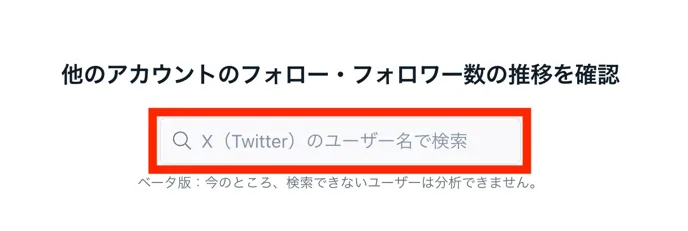
In competitor analysis, you can check other accounts' data to conduct research and compare metrics. From the items at the top right, you can select the "period" and "analysis range (day, week, month)" you want to analyze.

2. Metrics you can analyze
You can see each account's metrics in a list, allowing you to understand competitor performance at a glance.
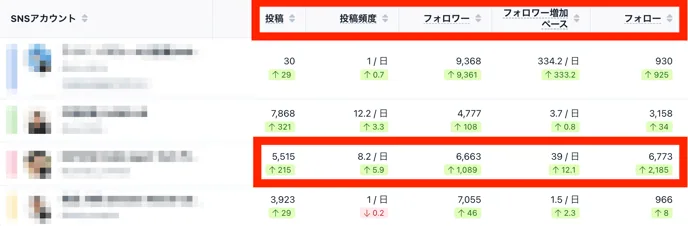
- What is the posting frequency?
- You can check how often competitors are posting. This helps you determine if your own account's posting frequency is appropriate.
- How much is the follower count increasing?
- By tracking the increase or decrease in followers within a specified period, you can analyze the growth speed and engagement trends of competitor accounts.
- How much is the following count increasing?
- You can see the pace at which competitor accounts are following others.
In the account outlined in red, you can see that they are increasing their follower count by maintaining a posting frequency of 8.2 times per day and increasing their following count.
Additionally, by analyzing the number and frequency of posts from growing accounts, you can set appropriate KPIs for your own account's post count and followers.
View in graphs
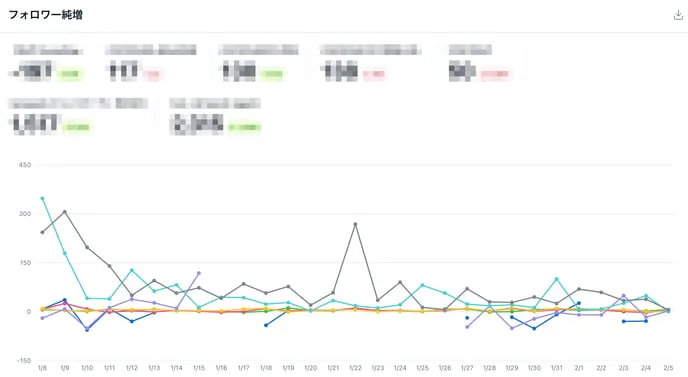
With the Competitor summary feature, you can visually check each metric in graphs, which is useful for internal reporting and creating client reports.
Data can also be downloaded as a CSV file, making it easy to perform your own analysis or integrate it with other data.
Analyze in more detail
You can also access X profiles directly from the Competitor summary screen for analysis. Below, we explain the key items to check on X.
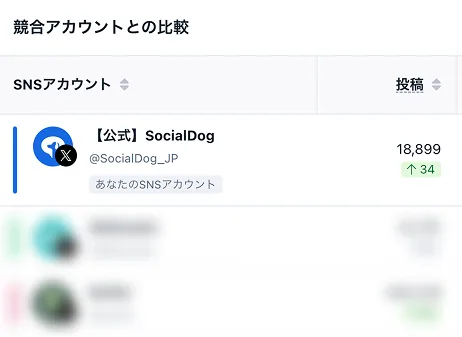
- Identify effective content
By checking the content of competitor posts, you can see which types of posts are gaining impressions and engagement. This allows you to improve your own posting strategy and create content that resonates with more users. - Optimize posting times
In addition to posting frequency, checking the timing of posts helps you understand when to post to reach the most people. - Identifying trends
By checking which topics competitor accounts are focusing on, you can stay on top of the latest industry trends. Since X is highly real-time, you can quickly adapt your own content by referencing competitor activity. - Analyze user reactions and pain points
By checking replies and reposts (retweets) on competitor posts, you can learn about the concerns and interests of their followers. This information can be used to improve your own content and services.
3. Criteria for selecting competitor accounts
- Accounts in the same industry or with high relevance
Choosing accounts with similar industries, business models, products, or services will improve the accuracy of your comparisons. - Target accounts
Accounts with high follower counts and engagement rates that achieve your ideal results can serve as a reference for setting KPIs. - Multiple accounts of different sizes
Including not only accounts of a similar size to yours but also larger and smaller accounts allows for analysis from various perspectives.
Summary
With SocialDog's Competitor summary feature, you can easily compare performance with other accounts. You can objectively analyze your own account while referencing competitors and success stories.
Additionally, data can be downloaded in CSV format, making it easy to cross-reference with other data for simple analysis. Using graphs allows you to efficiently create internal reports and client presentations.
Continuous data analysis and rapid implementation are essential for successful social media marketing. Use SocialDog's Competitor summary feature to make your X operations more effective.
For detailed instructions on using "Competitor summary," please refer to Competitor summary (X) and Setting up competitor accounts.