Increasing your follower count is essential for successful SNS marketing on X. However, many struggle to identify which strategies are truly effective. Here are three specific strategies to gain followers efficiently, along with SocialDog features.
*Some features may not be available depending on your plan.
1. Run giveaway campaigns
Giveaway campaigns are an effective way to gain many followers in a short period. However, success requires careful planning. Here are the key points for designing an effective campaign.
Setting campaign requirements
A successful campaign requires appropriate entry requirements and attractive rewards. To increase followers, campaigns where "following" and "reposting" are entry requirements are generally effective. This creates a synergy between campaign reach and follower growth.
Selecting giveaway prizes
The choice of prize significantly impacts the quality of followers you gain. Consider the following pros and cons to choose the best prize for your business.
General-purpose items like Amazon gift cards
- Pros: You can expect participation from a wide range of users, potentially leading to a rapid increase in followers.
- Cons: You may see an increase in users uninterested in your products or "sweepstakes accounts" just looking for prizes, which could lower follower quality.
Your own products or related items
- Pros: Attracts users interested in your products, making it easier to gain high-quality followers.
- Cons: Participation is more limited, so the pace of follower growth will be slower.
Use SocialDog's "Post Reactions"
You can easily run campaigns by utilizing post reactions.
Detailed instructions can be found in "Running a follow & repost campaign".
2. Improve daily posts
Analyzing and improving your daily posts on X is essential for growing your followers. It's crucial to analyze what resonates with your audience, including post characteristics, optimal posting times and days, and the impact of videos and images.
Use SocialDog's "Post analytics"
Use "Post analytics" to identify effective posts. Specifically, analyze the following:
- Posts with the highest engagement
- Most effective posting times
- High-performing image and video posts
Furthermore, by using A/B testing, you can compare the performance of different content and choose the best option.
Note that engagement tends to be higher during campaign periods, so you should analyze these separately from regular posting periods.
Check post performance details
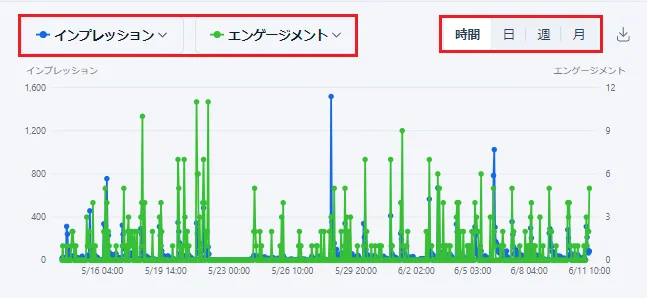
In Post performance, you can check the impressions and engagement earned by your posts by hour, day, week, or month. In addition to the number of replies, likes, and reposts (retweets), it supports a wide range of analysis metrics such as URL clicks, hashtag clicks, detail clicks, and video views.
You can change the analysis items in the graph using the dropdown menu and display up to two items simultaneously. You can also change the date range and check values by hour, day, week, or month.
You can also check detailed statistics such as impressions and engagement for each post.
Posts can be sorted in ascending or descending order by each item (such as impressions or engagement), allowing you to identify high-performing posts at a glance.
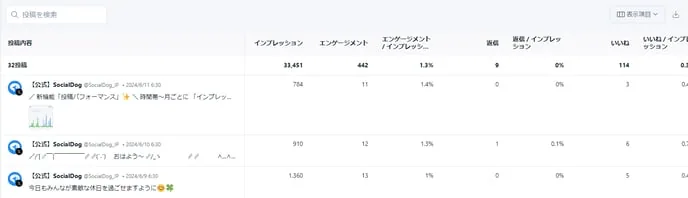
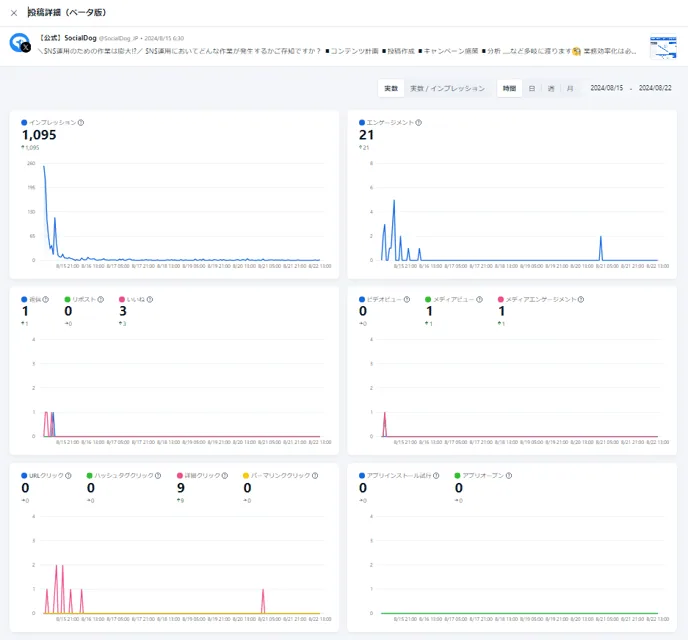
Clicking a post opens the "Post details" page.
On this page, the performance of the selected post is graphed, allowing you to understand its impact at a glance.
Identify peak engagement times
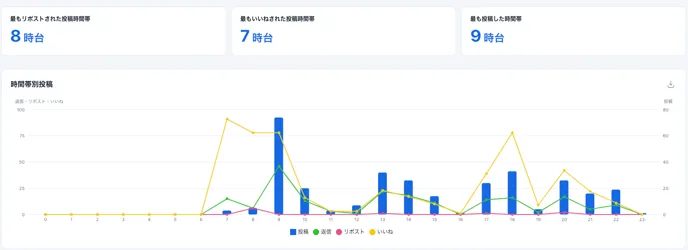
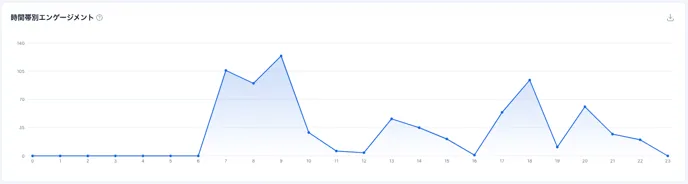
In the "Time of day" analysis, you can check engagement based on the time of day you posted.
Target users and peak engagement times vary depending on your account's content. It is crucial to understand the optimal posting time. To increase engagement efficiently, identify the best times and adjust your posting schedule.
In "Posts by time of day," you can see the total number of posts, replies, reposts, and likes for each time slot. Generally, engagement tends to be higher during times with more posts. You can also see engagement by time of day at a glance.
Media and hashtag engagement analysis
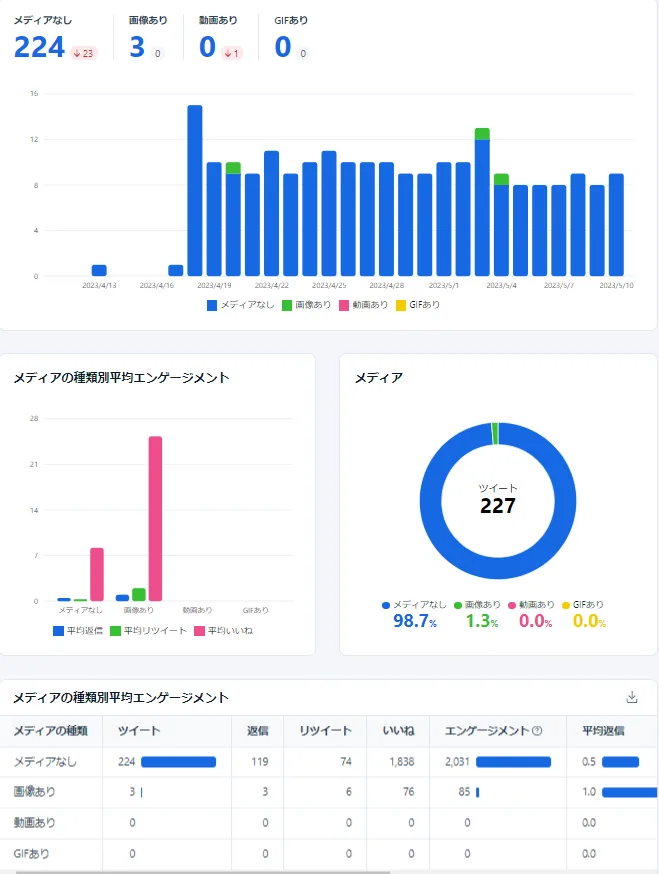
In Media Analytics, you can check engagement by images, videos, GIFs, or posts without media.
In the example below, you can see that posts with images have higher engagement than those without media.
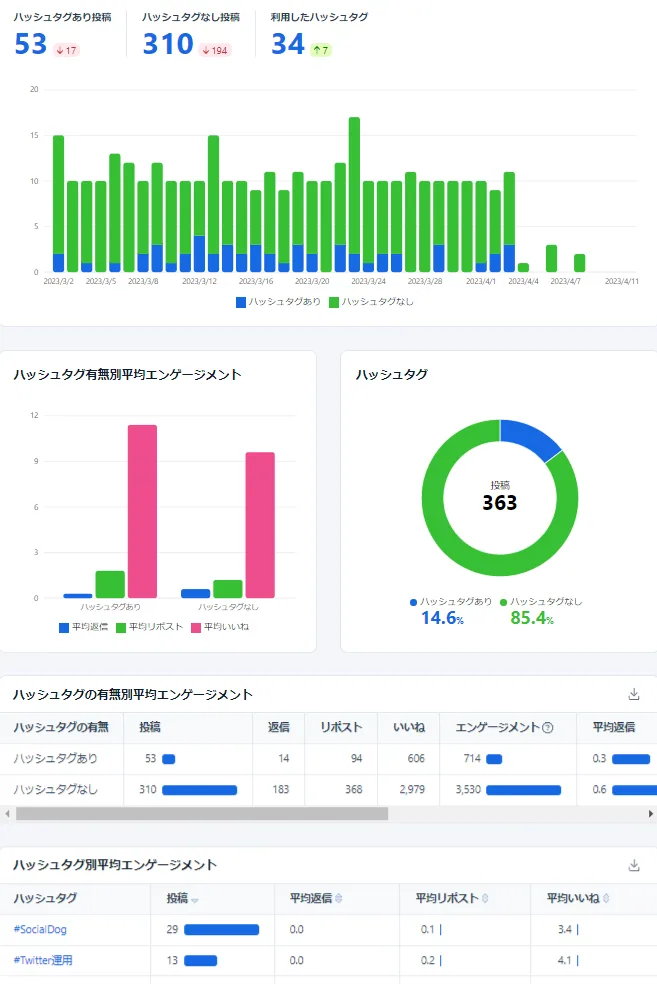
In Hashtag Analytics, you can check engagement based on the presence or specific content of hashtags.
In the example below, you can see that posts "with hashtags" have higher engagement than those "without hashtags." Additionally, for posts "with hashtags," you can see which ones are most effective in the "Average engagement by hashtag" section.
Identify high-engagement posts
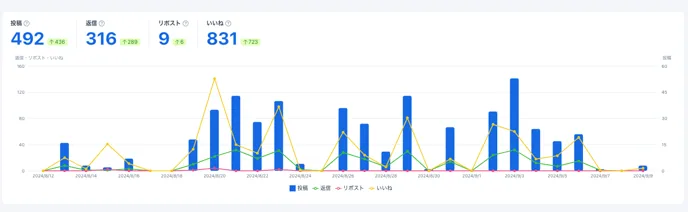
In Engagement Analytics, you can view a list of posts with high engagement.
Compare the number of posts and engagement with daily, weekly, and monthly graphs, and view a list of top-performing posts.
3. Proactive approach
To increase followers, you shouldn't just wait; it's essential to take a proactive approach. The foundation of using X for business is building brand awareness, so reach out to targets who could become your customers.
Creating a target list
First, it's crucial to carefully select keywords that your target customers use in their posts. Choose keywords based on topics related to your company, industry, or customer interests, and list potential followers accordingly. This allows you to gain high-quality, relevant followers.
When taking actions like following, liking, or replying, it's important to set clear criteria for which accounts to approach to avoid brand reputation risks. Setting these standards ensures precise engagement and helps with risk management.
Direct outreach to target audiences
By engaging with your target audience through likes, replies, and follows, you increase the likelihood of them becoming interested in your brand.
Use Keyword Monitor to list and approach users who are posting with specific keywords.
Setting up Keyword Monitor
- Click Inbox from the menu.
- Click Keyword Monitor Settings.
- Click Add.
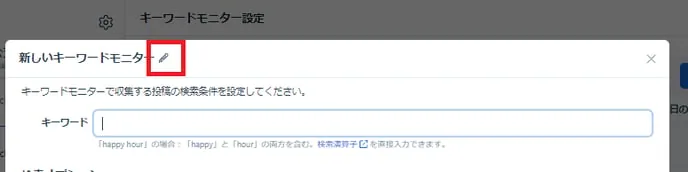
- Click the "✎" icon next to the new Keyword Monitor and enter a title.
- Enter the keywords you want to track in the keyword field.
- Click Add to complete the setup.
Collecting posts with Keyword Monitor
- Click the keyword you want to collect posts for.
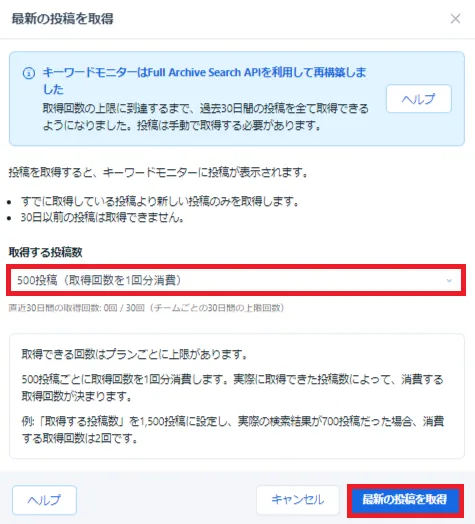
- Click 'Get latest posts' at the top of the screen.
- Select the 'Number of posts to get' from the dropdown and click 'Get latest posts' at the bottom right (you can choose the number of times to get posts depending on how many you want to collect).
Summary
Increasing your follower count is essential for SNS marketing success. It's not just about the numbers; it's important to gain followers who are highly engaged and interested in your content.
By using SocialDog's analytics features, you can reach the right audience and grow your followers efficiently. High-quality followers require a careful approach, as long-term relationships are built on shared interests.
Grow your high-quality follower base and aim for long-term account growth.