Overview
SocialDog now supports scheduling for Instagram Stories.
Previously, SocialDog allowed scheduling for Instagram feed posts and Reels, but Stories had to be posted directly from the official Instagram app.
With this update, you can now schedule Stories from SocialDog. Manage all your Instagram posts in one place to streamline your workflow.
For more details, please check the following page.
SocialDog Help > Schedule Instagram Stories
Eligible plans
Available for all plans, including the Free plan
What you can achieve with this feature
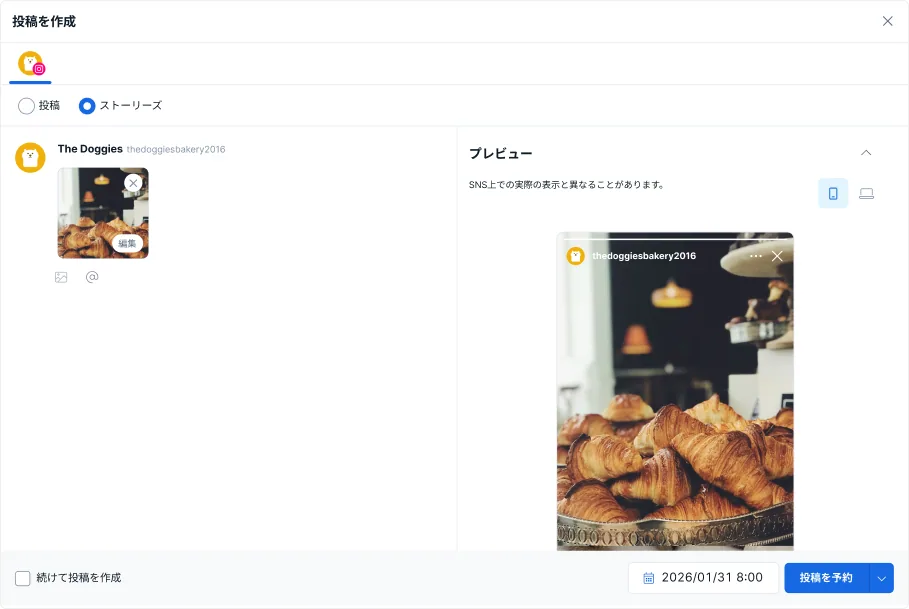
Previously, SocialDog only supported scheduling for Instagram feed posts and Reels. Now, you can schedule Stories as well. You can now schedule all your feed posts, Reels, and Stories directly from SocialDog.
Manage all Instagram posts in one place
In addition to feed posts and Reels, you can now schedule Stories from SocialDog.
Previously, you had to use SocialDog for feed posts and Reels while using the Instagram app for Stories. Now, you can manage everything in one tool, simplifying your posting process.
View scheduled Stories on the calendar
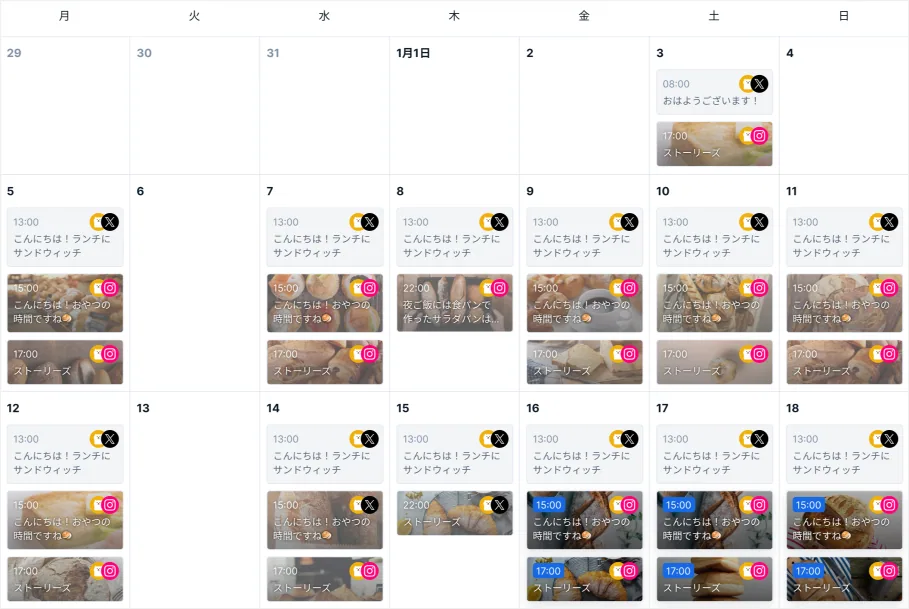
Scheduled Stories are now displayed on the calendar.
You can view them alongside feed posts and Reels to see your weekly schedule at a glance. This solves issues like forgetting to post or having difficulty tracking your schedule because Stories weren't visible on the calendar.
Supports both images and videos
Both images and videos are supported for Stories.
Using media with the recommended aspect ratio (9:16) ensures optimal display on Instagram.
However, if you post media with a different aspect ratio, Instagram may add borders or crop parts of the content.
Limitations of Instagram Stories scheduling in SocialDog
While SocialDog supports posting images, videos, and mentions in Stories, the following features are not supported:
- Adding music
- Adding text
- Adding stickers
- Survey
- Questions
- Emojis
- Links
- Hashtags
- Mentions
- Location
To use these features, you will need to use the official Instagram app.
For more details, please check Schedule Instagram Stories.
Background
Previously, even if you could schedule feed posts and Reels in SocialDog, Stories had to be posted manually from the official Instagram app.
This workflow not only fragmented the posting process but also made it difficult to track schedules and led to missed posts since Stories weren't on the calendar. We received many requests from users wanting to manage Stories in SocialDog as well.
In response, we've added support for scheduling Stories, allowing you to manage all your Instagram posts within SocialDog. This will help streamline your workflow and enable more strategic content management.
We will continue to provide features that support your SNS operations.
About SocialDog
SocialDog is an all-in-one tool with a comprehensive suite of features designed for effective and efficient SNS marketing.
We support efficient operations with advanced features such as advanced post scheduling, follower management, SNS campaign management, social listening, analytics and reporting, team account management, centralized management of multiple accounts, and competitor analysis.
You can start for free, and it is used by a wide range of users, from beginners to professionals.