
With Post performance, you can analyze 15 key metrics on X (Twitter) in detail. This article explains how to analyze using Post performance, along with the definition and importance of each metric.
Please also see "How to analyze posts: Basics" for an explanation of basic post analysis methods.
How to analyze each metric
- Log in to SocialDog and click "Post performance" under "Analytics" in the menu.
- Select the "Period" and "Interval" (hourly, daily, weekly, monthly) you want to analyze from the top right.
- The analysis results for the selected period will be displayed in graphs and post details.
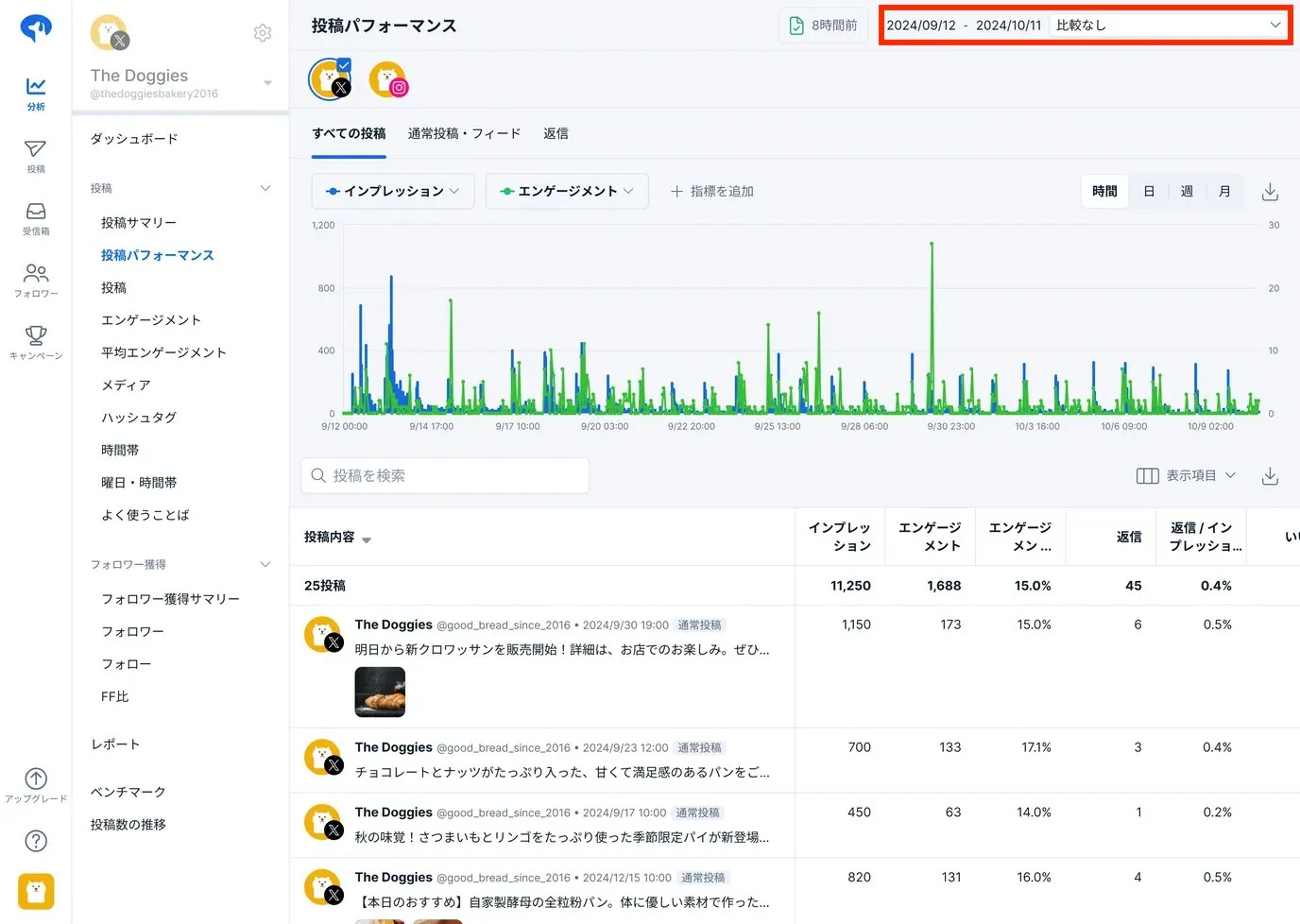
With the three steps above, you can now check the status of your post impressions. From here, we will explain how to find effective posts.
- Click the ▽ icon for impressions in the post content
- Posts are displayed in descending order of impressions

In this way, you can view a list of posts with a high number of impressions.
For example, if Post A has 3,000 impressions and Post B has 2,500, it suggests that Post A's content or presentation resonated better with users.
Effective posts are likely to perform well again if you post similar content in the future (reproducibility), so analyze their characteristics and "create patterns for regular posting." By trying various posts in parallel and increasing the number of patterned posts, you can continuously create effective content.
Furthermore, data can be downloaded as a CSV file, making it easy to perform your own analysis or integrate it with other data.
Metric definitions and importance
We will explain the "15 metrics" that can be analyzed with Post performance. Deepen your understanding of the metrics that align with your account's goals and aim to maximize your social media marketing results.
For metrics based on KPIs (quantitative goals), see "X Management Guide ③: Setting KPIs" for a detailed explanation.
1. Impressions
- Definition
- The total number of times a post was displayed to users in their timeline or search results
- Metrics highly valued by the X algorithm
- Importance
- Measuring awareness
- A metric for measuring awareness; the higher the number of impressions, the more users have seen your post.
- Understanding potential reach
- An awareness metric for non-followers (via reposts (retweets) or searches).
- Measuring awareness
2. Engagement
- Definition
- The total number of user interactions with a post (clicks, reposts (retweets), replies, follows, likes, etc.)
- Metrics highly valued by the X algorithm
- Importance
- Measuring interest
- A metric to gauge how much users react or how interested they are.
- Measuring engagement rate
- The engagement rate (number of engagements ÷ number of impressions) quantifies not just how many people saw it, but "how many people took action."
- Measuring interest
3. Comments and replies
- Definition
- The number of times users replied to a post
- Importance
- Measuring fan base and communication
- Replies mean that "users have shared their own opinions or feedback," serving as a metric for the number of fans and the depth of communication.
- Interest in the topic
- Indicates the amount of discussion and feedback on the post content, allowing you to gauge interest or identify potential backlash.
- Measuring fan base and communication
4. Likes
- Definition
- The total number of times users "liked" a post
- Importance
- Measuring empathy
- A key metric for measuring agreement and resonance.
- Impact on algorithms
- Posts with many likes may be prioritized by algorithms, leading to increased exposure.
- Measuring empathy
5. Shares and reposts
- Definition
- Total number of times users reposted (retweeted) the post.
- Importance
- Scale of secondary reach
- One of the most effective actions for expanding reach and gaining new followers, as it appears on the timelines of non-followers.
- Evaluating brand virality
- A high number of shares and reposts (retweets) indicates that the brand or information is in a state where it can easily go viral.
- Scale of secondary reach
6. URL clicks
- Definition
- Total number of times users clicked a URL within the post.
- Metrics highly valued by the X algorithm
- Importance
- Measuring traffic performance
- A metric to measure the success of driving traffic to official sites, blogs, e-commerce sites, etc.
- Content relevance evaluation
- Check how well the post content matches the linked destination.
- Improving conversion rates
- A high URL click-through rate (URL clicks ÷ impressions) indicates that the offer or destination content is appealing.
- Measuring traffic performance
7. Hashtag clicks
- Definition
- Total number of times users clicked a hashtag within the post.
- Importance
- Measuring interest and engagement
- A metric showing that users were interested in the hashtag and explored further information.
- Campaign tracking
- Used as a metric to measure campaign effectiveness by tracking clicks on campaign-specific hashtags.
- Measuring interest and engagement
8. Detail clicks
- Definition
- Total number of times users clicked the post to view detailed content.
- Importance
- Measuring interest in the post
- A metric to measure the depth of user interest, such as wanting to see parts cut off in the timeline or viewing images and replies in detail.
- Measuring interest in the post
9. Permalink clicks
- Definition
- Total number of times the permalink to this post was clicked (desktop only).
- Importance
- Measuring external shares
- Measures the triggers for virality, as permalinks are used when sharing specific posts elsewhere.
- Understanding desktop usage
- A metric to understand access trends from desktops in an environment where mobile access is the norm.
- Measuring external shares
10. Profile visits
- Definition
- Total number of times users clicked your name, @username, or profile picture from the post.
- Metrics highly valued by the X algorithm
- Importance
- Measuring brand or personal appeal
- A metric that indicates the post was perceived as high quality.
- Gaining interest and trust
- Measures the number of users who became interested in the "poster themselves" rather than just the post and wanted to learn more.
- Measuring brand or personal appeal
11. Follows
- Definition
- Total number of times users followed you directly from a post
- Importance
- Ongoing content evaluation
- A metric that indicates users found value in the account itself, not just the post.
- Improving profile and content quality
- Increasing followers helps future posts reach more people and boosts engagement.
- Ongoing content evaluation
12. Shared via email
- Definition
- Total number of times users shared a post via email
- Importance:
- Reach beyond social media
- Metrics indicating the potential for content to spread not only on X but also through other channels such as email.
- Corporate and business perspective
- For B2B products, email sharing is often crucial, allowing you to track how much your posts are used in business communications.
- Reach beyond social media
13. Video views
- Definition
- Total number of times a video in a post was played for at least 2 seconds
- Importance
- Measuring video content
- Playing for 2 seconds or more is a metric indicating the user has actively started watching.
- Application to video marketing
- Combined with video views and completion rates, you can analyze areas for improvement in video production and what content users want.
- Measuring video content
14. Media views
- Definition
- Total number of times videos, images, or GIFs were displayed (including autoplay and clicks)
- Importance
- Visual content exposure
- Understand how much visual elements like images and videos are being viewed, not just text.
- Comparing content formats
- Compare the difference in engagement rates between text-heavy posts and those with images or videos.
- Visual content exposure
15. Media engagements
- Definition
- Total number of times images or videos in a post were clicked
- Importance:
- Measuring visual content
- Measure interest in media by tracking the number of actual clicks for expanded viewing or playback.
- Measuring interest
- Media clicks can be seen as actions based on clear user interest.
- Measuring visual content
Summary
- The importance of multi-faceted analysis
- With Post performance, you can also analyze metrics like "reply rate per impression" and "engagement rate per impression." Instead of looking at each metric in isolation, combining them allows you to derive more specific improvement strategies.
- Setting KPIs based on objectives
- The metrics you should prioritize vary depending on how businesses or individuals use X (e.g., brand awareness, product announcements, or driving website traffic).
- For metrics based on KPIs (quantitative goals), see "X Management Guide ③: Setting KPIs" for a detailed explanation.
- Optimizing post content
- It is important to continuously improve by adjusting text, visuals, hashtag usage, and posting times based on analysis results.
These "15 metrics" serve as the foundation for maximizing marketing activities, fan building, and information spread on X. By analyzing not just the "quantity" of numbers but also the "qualitative meaning" of each metric, you can drive social media management that leads to better results.
For detailed instructions on "Post performance," please refer to Analyze posts (Post performance).