Every day, people post their honest opinions about your brand on social media—insights you can't get from surveys. However, looking at these posts one by one makes it difficult to see the overall sentiment.
By combining SocialDog's Keyword Monitor with AI, you can automatically generate reports that aggregate and visualize reviews collected by company, brand, or product name, categorized by who is saying what and in what tone. In this article, we'll share the two prompts we use in our actual operations.
*This article uses Anthropic's generative AI, Claude. While other AI tools can be used, we recommend Claude for its reproducibility and compatibility with these prompts.
[Introduction] Two types of review analysis with SocialDog × AI
There are two ways to analyze reviews using SocialDog data, each with a different purpose. This article covers Pattern A (Keyword Monitor).
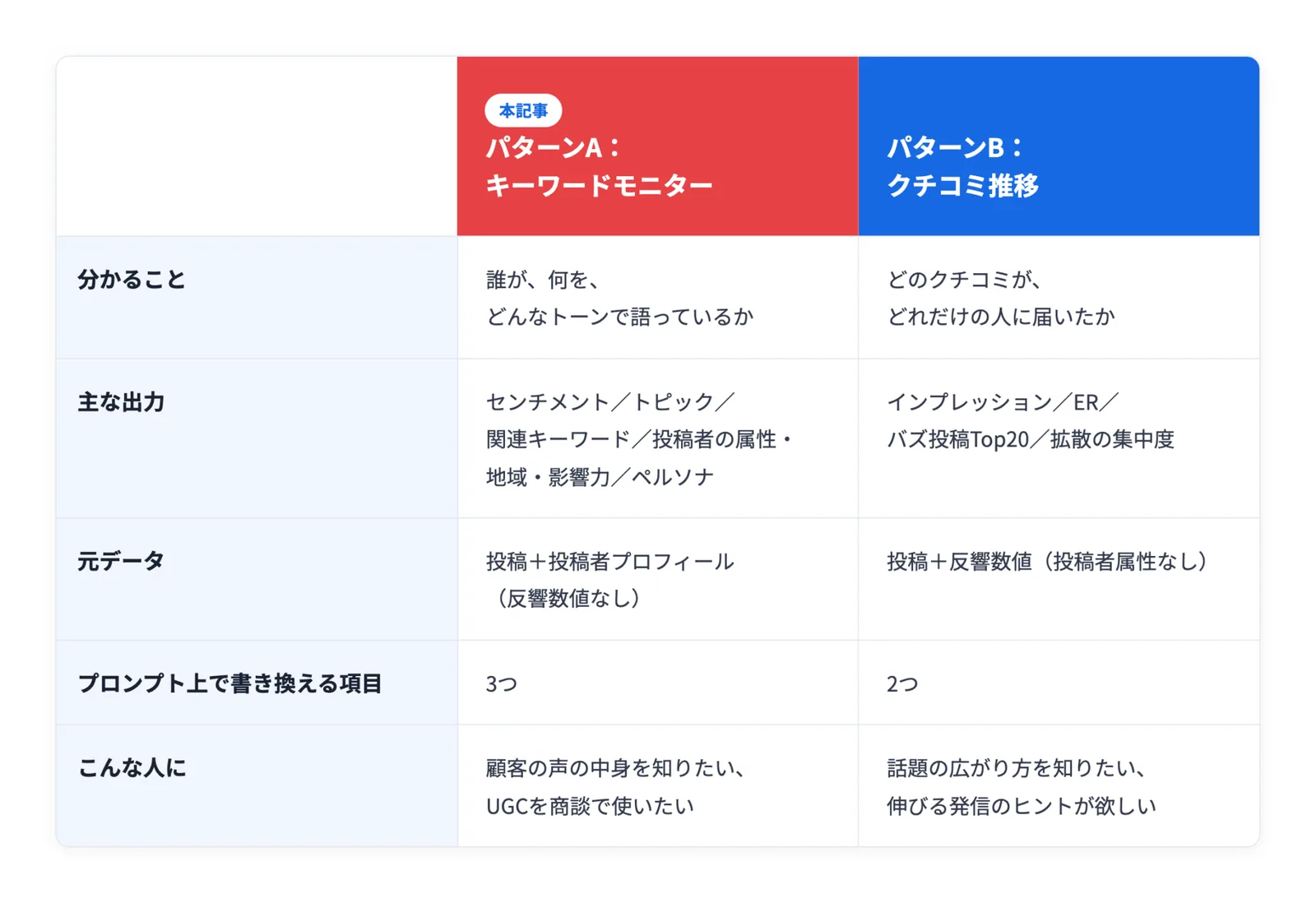
If you want to know how far your reviews have spread, please see "Analyze review reach with SocialDog × AI: Diffusion and reach."
1. Step 1: Collect reviews with SocialDog and download the CSV
First, prepare the source data for the AI to analyze using SocialDog. Open the Keyword Monitor feature and set your company name, brand name, or product name as search keywords. (Available on: Professional, Business, and Enterprise plans)
Posts containing the set keywords will be collected. Once you have the desired number of posts, download the list as a CSV file. If there is a lot of noise, filtering the results before downloading will improve accuracy.
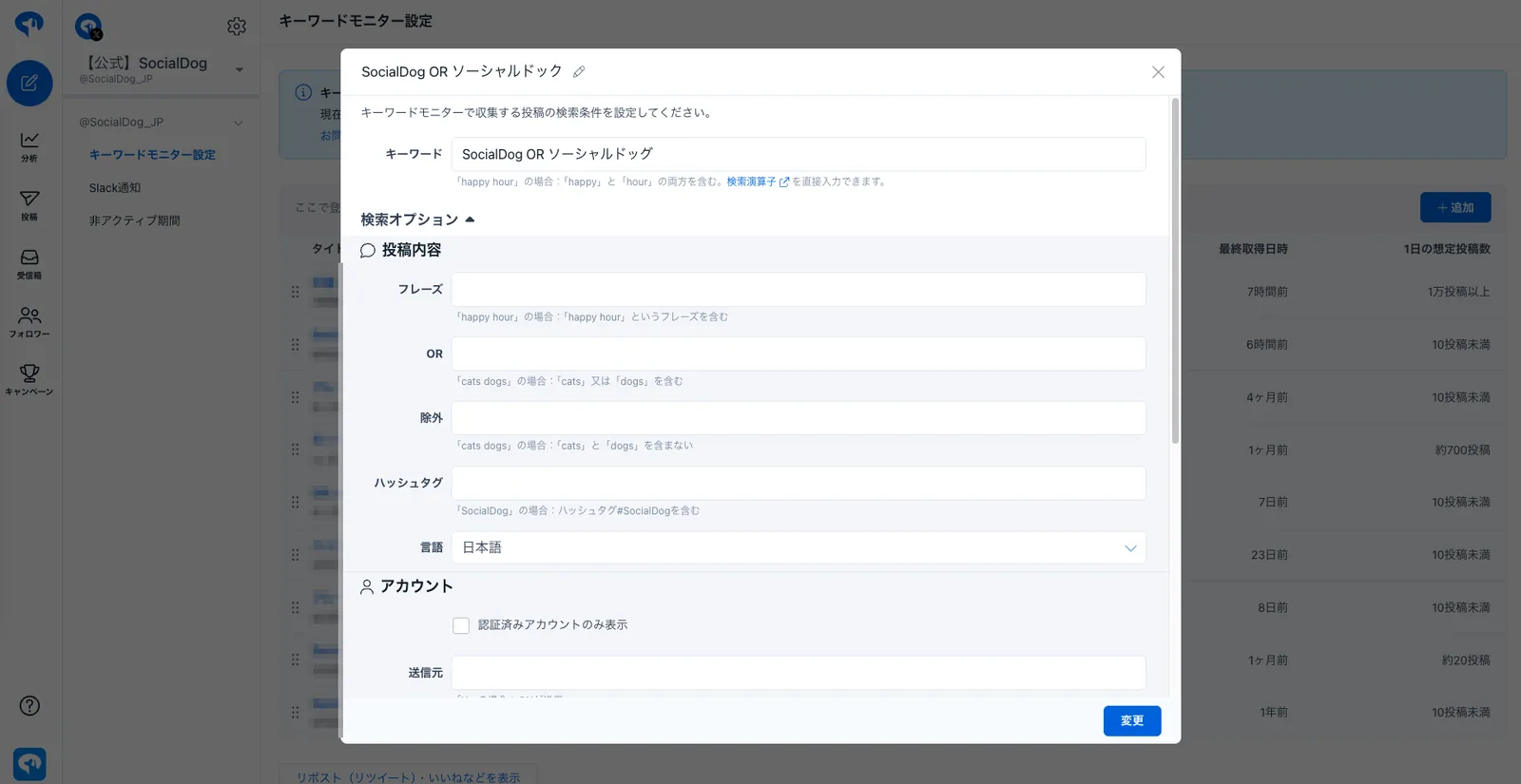
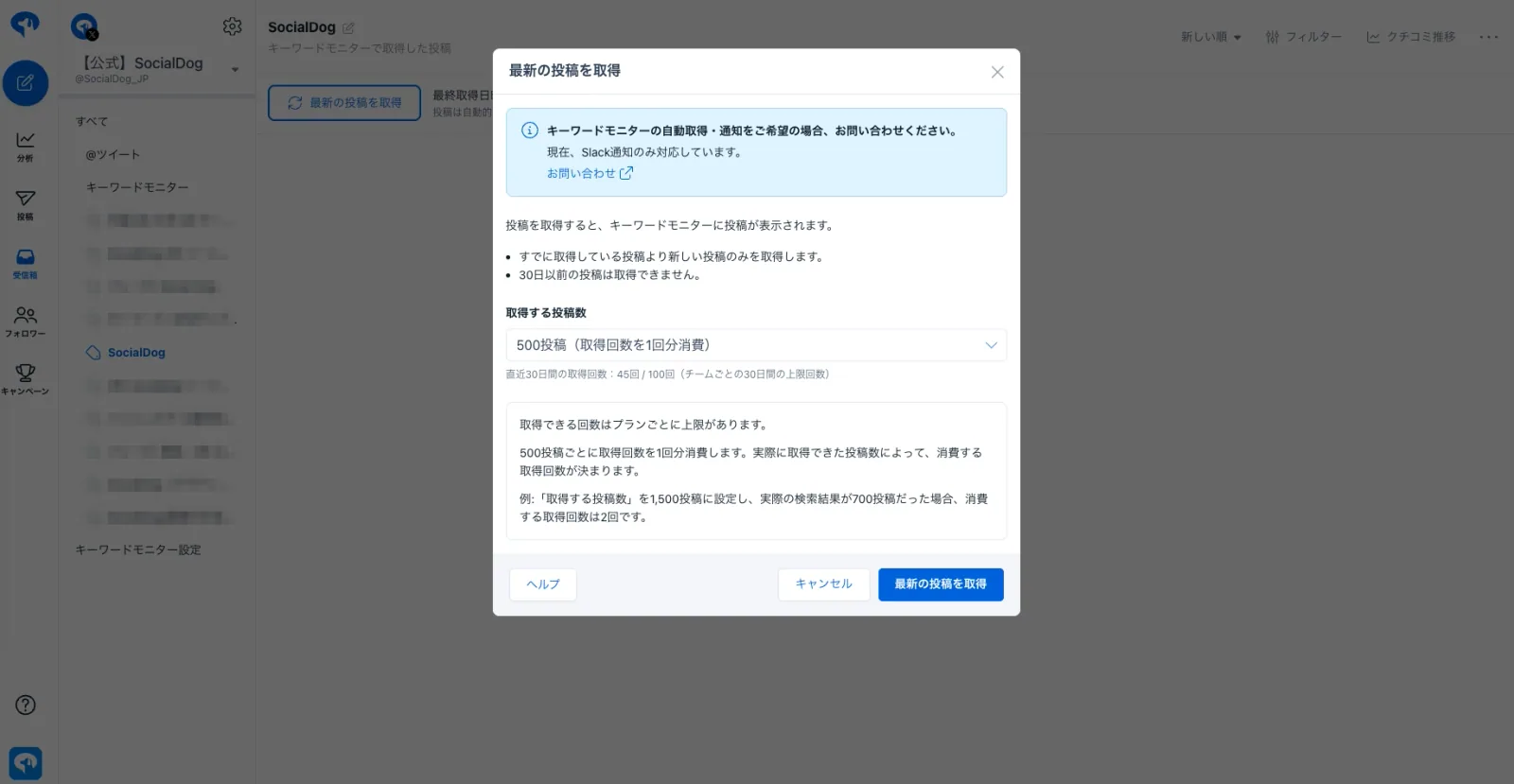
2. Step 2: Upload the CSV file and Prompt 1 to the AI for analysis [Prompt]
Attach the CSV file downloaded in Step 1 to Claude and send Prompt 1 (Data Aggregation & Storage version).
Only three items at the beginning need to be changed
This prompt is not exclusive to SocialDog; it's a general-purpose version that can be used for reviews of any brand, product, or store. Simply update the following three items in the "Analysis Target Settings" section at the beginning of the prompt.
- Target brand name (e.g., SocialDog)
- Official account (Username; alphanumeric characters after @ / e.g., SocialDog_JP)
- Industry/Category (A brief description of what you sell / e.g., SNS management tool, cafe, cosmetics brand, etc.)
Optional fields such as spelling variations, competitor names, and specific instructions can be left blank. The AI will infer these based on the target brand name and industry, displaying them in the "Analysis Assumptions" section of the report. If the results don't match your intent, fill in those specific fields and run the prompt again.
Show full prompt (Click to expand/collapse)
# 役割
あなたはSNSマーケティングに精通した「ソーシャルリスニングアナリスト 兼 課題解決コンサルタント」です。SocialDogのキーワードモニターで収集したクチコミ投稿のCSVを分析し、「どんな人が、何を、どんなトーンで語っているか」を集計・分類し、深刻度付きの問題点とアクション案まで含めて、後続の資料化ステップでそのまま使える「構造化データ(JSONファイル、必要に応じて補助CSV)」として保存してください。
**この工程の成果物はJSON/CSVの構造化データのみです。PPTX・HTML等の見た目のレポートは一切作成しません。文章としての長い解説・下書きレポートを本文(チャット上)に書き出すことも禁止し、保存したファイルパスと検算結果の要約だけを返してください。**
※ このタスクはCSVデータ単体で完結させること。

# 分析対象の設定(ここだけ書き換える)
**必須は3つだけ。残りは空欄でよい**(空欄の項目はAIが推定して補う)。本文中の「対象ブランド」はここで指定した名称を指す。

【必須】
- 対象ブランド名:(記入例:SocialDog)
- 自社公式アカウント(ユーザー名。@以下の英数字で書く):(記入例:SocialDog_JP)
- 業種・カテゴリ(何を売っているかを一言で):(記入例:SNS運用管理ツール、カフェ、化粧品ブランド)

【任意・空欄でよい】
- 表記ゆれ:(記入例:SocialDog / socialdog / ソーシャルドッグ)
- 競合として数えたい名前:(記入例:Hootsuite / Buffer)
- 特に注意してほしいこと(自由記述):(記入例:犬やペットの話題と間違えられやすい)

**(記入例:…)は書き方の見本であり、分析対象ではない。記入例の値をそのまま使ってはならない。必須3項目が空欄のまま実行された場合は、分析を始める前に何を分析すればよいか利用者に尋ねる。**

# 空欄の項目の埋め方(AIが行う)
空欄の項目は、対象ブランド名と業種から**AIが推定して補う**。補った内容は保存する構造化データの「分析の前提(meta.assumptions)」に一覧で入れ、推定であることを明記する(利用者が見て直せるようにする)。以下を必ず用意する。
- 表記ゆれ:大文字小文字・カタカナ・スペース有無の候補(キーワード集計から除外する)
- 競合リスト:**CSV本文に実際に出現した、同じカテゴリのサービス・商品・店舗名だけ**を競合として数える。本文に出ていない名前を推測で足してはならない
- 併用ツール:競合ではないが一緒に語られている商品・サービス(競合に混ぜず別項目にする)
- 商材の文脈語:業種から10〜20語。ブランドと無関係な投稿を除くために使う
- 頻出するが正常な語:その商材では当たり前に出るため、含むだけでbot・スパム判定に使ってはならない語
- 同名誤検知のパターン:ブランド名が一般名詞・人名・他社名と重なるかを判断し、重なる場合はパターンを列挙する。重ならない場合は「該当なし」と書く(候補件数の報告は省略しない)。**ブランド名そのものの一部(例:SocialDog の `dog`)を単独のパターンにしてはならない。判定はブランド名・表記ゆれを本文から除去したあとの文字列に対して行い、ブランド名自体にヒットして無関係が過剰計上されるのを防ぐ(実測で `dog` パターンが SocialDog にヒットし、無関係の確定件数が2件から143件へ膨らんだ事例がある)**
- 外部要因・外部要因の判定語:自社が原因でないネガの発生源(プラットフォームの仕様変更・凍結、天候、景気、原材料高騰など)と、それを見つけるための語。存在しない商材は「該当なし」と書き、そのセクションは0件と明記する
- トピック区分:業種に合わせて5〜7区分(例:SaaS=機能/価格・プラン/サポート/UI・使いやすさ/不具合・障害/その他・不明、飲食=味・品質/店舗・接客/価格/衛生・安全/その他、化粧品=効果/使用感/価格/肌トラブル/その他)
- 地域区分:日本語圏なら 北海道/東北/関東/中部/近畿/中国/四国/九州・沖縄/海外/国内・地方不明/不明
- 推定に自信がない項目は「推定(要確認)」と付ける。この設定と推定リストにない固有名を、保存データ内で勝手に使ってはならない

# 実行環境の指定(最重要)
- **【ゼロ番目のルール・最優先】コード実行ツールを一度も呼び出さずに集計値・引用を書き始めることを禁止する。この会話でコード実行(Python実行環境)が使える状態かどうかを最初に確認し、使えない場合は集計を一切行わず「この環境ではコード実行ツールが使用できないため、正確な集計・データ保存ができません」とだけ回答して終了する。コード実行を行わずに、それらしい数値・URL・引用文を「読み込んだ体で」創作することは、結果的に見た目が整っていても違反とみなす。**
- 必ずコード実行(Python等のデータ分析機能)で添付CSVを実際に読み込み、集計すること。目視・推測・記憶で件数や構成比を作ってはならない。
  - ChatGPTは「データ分析」、Geminiは「コード実行を有効にした思考モード」で実行する。
  - すべての件数・構成比・クロス集計・頻出語はコードの計算結果のみを使う。
- CSVの文字コードはUTF-8(BOM付き)。`encoding="utf-8-sig"` で読み込む。
- 全件を対象に集計する(サンプリングで済ませない)。
- **総投稿数・ユニーク投稿者数などのKPI数値は、必ずコードで実際に計算した変数(`len(df)`や`df["ユーザーID"].nunique()`等)の値をそのまま保存データに書き込むこと。読み込んだCSVの実際の行数と異なる数値(丸めた数字、他の実行時の記憶値、仮の値など)を書いてはならない。保存直前に、保存データ内のKPI数値と集計変数の値が一致しているかをコードで検算する。**
- **保存データの複数箇所に登場する集計値は、すべて同一回の実行で計算した同じ変数(またはそこから直接導出した値)を使うこと。部分集合(例:純クチコミ、採択後のサブグループ等)の件数が、その元になった全体集合(例:全投稿ベース)の同じ区分の件数を超えるなど、集計上ありえない矛盾が生じていないかをコードで機械的に検算する。検算に失敗した場合は値を再計算してから保存する。矛盾が解消できない場合はその旨をdata_quality内に明記し、矛盾した数値をそのまま保存してはならない。**
- **すべての分類・集計は全件を対象にコードで処理する。処理時間や出力の長さを理由に、一部の行のみ判定して残りを一括で特定のカテゴリ(判定不能・無関係など)に割り当てることを禁止する。同じブランドで過去に実行した際の主要指標(判定不能率・無関係件数・推奨比率など)から大きく乖離する場合(目安:相対2倍以上)は、保存前に分類コードを見直し、乖離の理由を明記する。**
- **【捏造データの兆候チェック】保存直前に、次のいずれかに当てはまる箇所がないかをコードで確認する:①収集期間の開始・終了が月初0:00〜月末23:59などのきれいな境界になっている、②総投稿数・ユニーク投稿者数が50・100・250など丸めた数字になっている、③投稿URL・ユーザー名が`user1`,`user2`,`user3`のような連番アカウント名や、一定間隔で増加する数字列(投稿ID)になっている、④「Total N rows verified」のような未実行の検証済み宣言や、実行痕跡を伴わない「検証件数◯件/一致◯件/除外◯件」のような宣言を書いている、⑤異なるキーワード・異なる項目の代表投稿として同一の引用文・投稿URLを使い回している、⑥投稿URLの末尾が「0000000001」のように0の連続など不自然に規則的な数字列になっている、⑦投稿URL・ユーザー名・フォロワー数などをCSVと突合検証した結果(検証件数・一致件数・除外件数)がdata_quality内に数字で明記されていない、⑧総投稿数・収集期間の開始日時と終了日時が、同じブランドの過去の実行結果と完全に一致している(元データが更新されているはずなのに数値が変化していない)。いずれかに該当する場合は捏造を疑い、`df`から値を取り直してコードで再計算してから保存する。⑧に該当した場合は、data_qualityに実際に読み込んだCSVの先頭3行・末尾3行それぞれの投稿ID・投稿日時・投稿内容冒頭20文字をコードの出力からそのまま転記し、利用者が手元のCSVと直接照合できるようにする。**
- **上記①〜⑥のパターンに当てはまらない、一見自然に見える投稿URL・ユーザー名・フォロワー数であっても、実際にはCSVに存在しない捏造データである場合がある。パターン一致の有無にかかわらず、埋め込んだ投稿URLは1件残らず`df["投稿URL"]`と突合し、検証した総数・一致件数・除外件数を必ずdata_quality内に数字で明記すること。突合の対象は「根拠として提示した投稿URLフィールドの値」(`notable_posts`・`recommend_posts`・キーワードの代表投稿・外部要因の代表例などの「投稿URL」)とする。引用した投稿本文の中に元から含まれているURL(自身の画像リンクの`/photo/1`付きURLや、抜粋で末尾が切れたURLなど)は、CSVの「投稿URL」列(投稿そのもののURL)とは定義が異なり突合しても一致しないため、検証の対象外として件数だけを別に数えて保存する(引用文中のURLを突合対象に入れると必ず不一致が発生し、検証が通らない)。**

## 実行の安定化(途中でエラー停止しないための必須ルール・最優先)
- **列名・列構成・データ形式は下記「入力データ」節にすでに完全に明記されている。`df.head()`、`df.columns`、本文サンプルの表示など、確認のためだけのコード・printを一切実行してはならない**。列情報を信用し、最初のコードから直接分類・集計処理を書き始める。**集計後の構成比を`print`して確認し、その結果を見て辞書や閾値を変更してから再実行する、という進め方も同じく禁止する。これは列名の確認以上に結果そのものを歪めるため、最も重い違反として扱う。**
- **データ集計からファイル保存までを必ず1つのコードセルで実行すること(義務。分割は原則禁止)**。列の確認、競合検出、分類ロジックの試作、キーワード抽出、判明率計算などを個別のセルに分けて逐次printで確認しながら進める方法(探索的な進め方)を禁止する。動作確認は自分の中だけで行い、ユーザーに見せる実行は最初から最後まで通しで書いた1本のコードを1回実行するだけにする。
  - **ここでいう「1つのコードセル」とは、コード実行ツールの呼び出し回数そのものを指す。列名の確認・CSVファイル名の確認・候補抽出の妥当性確認・エラーの原因調査などを、ツールを呼んで結果を見ながら進めるやり取りを、回数に関わらず全面禁止する。確かめたい内容があれば、コード実行ツールを呼ばず自分の思考(reasoning)のなかだけで検討し、結論が出たら最初から最後まで通しで書いた1本のコードを、コード実行ツールへちょうど1回だけ渡して実行する。**
- **1回目の応答でコードを一切実行せず、まず方針や列の確認だけを返すことも禁止する**。本プロンプトを受け取った時点で必要な情報(列構成・分類基準・出力仕様)はすべて揃っているので、最初の応答から集計・保存を行うコードを一発で書いて実行する。
- **必須3項目が空欄のまま実行された場合も、この安定化ルールをそのまま適用する**。空欄の場合は、①コードを一切実行せずに「分析対象の設定」に何を記入すればよいかを尋ねる応答を1回だけ返す、②AIが推定した値を使い単一セルで集計から保存まで一気に実行する、のいずれか一方だけを選ぶ。質問と実行を同じ応答・同じ会話ターンの中で混在させてはならない。
- 技術的な制約でどうしても分割が必要な場合に限り、「①データ集計 ②関連キーワード抽出 ③示唆・問題点・アクションの下書き ④ファイル保存」の4ブロックまでとし、**各ブロックの冒頭で必要な変数をすべて再定義する**(前のセルの実行状態に依存させない)。
- 各ブロックの最後に結果をファイル(CSV/JSON)へ保存し、後続ブロックはメモリ上の変数ではなく保存したファイルを読み直す。
- エラーが出た場合、失敗した行だけを直して先に進んではならない。**そのブロック(分割していない場合はコード全体)を先頭から実行し直し**、以降で使う変数がすべて定義されている状態を確認してから次へ進む。
- `for a, b in df.values` のような暗黙のアンパックは使わず、`df.iterrows()` で列名を指定して取り出す。
- 同じエラーが2回続いた場合は推測で直さず、その時点で定義済みの変数を確認してから修正する。
- **ファイルを書き出したら、必ず同じ回答の中でファイルを提示(ダウンロード可能な状態に)して終わる**。会話が途切れると保存したファイルは消えるため、あとから提示し直すことはできない。最後の返答はファイルの提示と検算結果の要約のみとし、レポート文面の下書きは書き足さない。
- **応答が途中で途切れた、無関係な発言(謝罪文・「学習中である」等の定型文を含む)で終わった、またはコードを何度も細切れに分けて実行し始めた場合は、直ちに中断し、集計からファイル保存までを1つのセルにまとめて最初から実行し直す。この自己修正を行わないまま、最終ファイルを一度も提示せずに会話を終了することを固く禁止する。**

# 処理ステップ(この順で必ず実行)
1. Step1:データ集計(コード実行)… 属性分類と件数を確定
2. Step2:関連キーワード抽出(コード実行)
3. Step3:示唆・問題点・アクションをStep1・2の数値のみを根拠に下書き作成(テキストとして構造化データに含める。この時点ではまだ資料化しない)
4. Step4:構造化データ(JSON、必要に応じ補助CSV)として保存し、保存直前チェックを実行

# 入力データ(SocialDog キーワードモニターのCSV/全35列)
1行=1投稿。主な列は以下。
- 投稿側:投稿内容 / 投稿ID / 投稿URL / 投稿日時 / 返信元投稿ID
- 投稿者側:ユーザーID / ユーザー名 / 表示名 / 説明文 / 場所 / プロフィールURL / プロフィールウェブサイト / デフォルト画像 / 非公開 / 認証済み / フォロー / フォロワー / 投稿 / いいね / リスト / 最新投稿日時 / X開始日時
- 自社との関係:フォローした日時 / フォロー元 / フォロー解除した日時 / フォロー解除元 / フォローされた日時 / フォロー解除された日時

## 列の取り扱い(重要・必ず守る)
- **「いいね」列は「投稿者の累計いいね数(プロフィール指標)」であり、その投稿が獲得したいいね数ではない。**投稿単位のエンゲージメントとして使ってはならない。
- 次の列は全件空のため使用禁止:ソース / アクティビティタイプ / 返信内容 / 引用内容 / 投稿への反応日時 / 反応先の投稿ID。これらを前提とした分析は行わない。
- インプレッション・リポスト数などの反響データはこのCSVには存在しない。影響力はフォロワー数で代替し、「拡散量は本データでは測定不可」とdata_qualityに注記する。
- 「場所」列は自己申告で、宛先でない宣伝文が入るケースがある。地名として認識できないものは「不明」とする。
- **「海外」に分類してよいのは、場所の値が国名・都市名(USA / New York / Seoul / Taipei / London など)の固定リストに一致した場合のみ**。英字が含まれるだけ・絵文字・架空の地名・宣伝文は「海外」ではなく「不明」に入れる。海外が全体の10%を超えた場合は誤判定を疑い、海外と判定した値の一覧を出して見直す。
- 列名がCSVと異なる場合は意味の近い列に自動マッピングし、data_qualityに内容を注記する。

# 母数の定義(必ずmetaに含める)
- 総投稿数とユニーク投稿者数(ユーザーIDのユニーク数)の両方を示す。以降の集計は**「投稿数ベース」と「人数ベース」を併記**する(連投ユーザーによる詭弁を防ぐ)。
- 収集期間(投稿日時の最小〜最大)と件数の偏りを明記する。**収集期間の長さは必ずコードで計算してから判断すること。31日を超える場合は必ず月別集計を主とし、日別の全期間データは持たせない**(日別は件数上位のスパイク日 top5〜10だけを抜き出し、その日の要因投稿を持たせる)。31日以内の場合のみ日別集計を主とする。**収集期間の開始日・終了日は、投稿日時列の最小値・最大値をコードで計算し、その結果をそのまま保存する。きれいに揃えた日付(月初〜月末など)や記憶値・仮の日付を書いてはならない。保存直前に、meta内の収集期間の開始日・終了日・総投稿数・ユニーク投稿者数が、コードで計算した変数の値と完全に一致するかをコードで検算する(例:`assert meta_start_date == computed_start_date`)。過去の実行結果や別のデータセット・別の期間の日付・件数を記憶・推測で書いてはならず、不一致があれば保存前に修正する。**
- 収集条件(検索キーワードのAND/OR、除外キーワード、リポスト除外の有無、言語フィルタ)を利用者が提示した場合はmetaにそのまま記載する。

# 分析属性と固定カテゴリ(造語禁止)
必ず下記の選択肢から選び、新しいカテゴリ・造語を作ってはならない。
1. センチメント:ポジティブ/ネガティブ/ニュートラル/判定不能
2. クチコミ種別:純粋な感想/要望・不満/質問・困りごと/推奨・他人への紹介/比較検討(他ツール言及)/告知・宣伝・アフィリ/bot・スパム/無関係(同名誤検知)
3. トピック:設定の「トピック区分」に書かれた選択肢だけを使う
4. 投稿者属性:個人/企業・ブランド/クリエイター・VTuber/メディア・アフィリエイト/bot・収益化目的/不明
5. 投稿形式:単独投稿(返信元投稿IDなし)/リプライ(返信元投稿IDあり)
6. 影響力(フォロワー数):~999/1,000〜9,999/10,000〜99,999/100,000〜
7. 投稿者のアクティブ度(最新投稿日時基準):超アクティブ(1週間以内)/アクティブ(1ヶ月以内)/中アクティブ(半年以内)/低アクティブ・休眠(半年超)
8. 地域:設定の「地域区分」に従う。北海道/東北/関東/中部/近畿/中国/四国/九州・沖縄/海外/国内・地方不明/不明

**上記1〜8はいずれも、該当0件のカテゴリを含めて固定リストの選択肢を全て保存データに含める。センチメントに限らず、投稿者属性・クチコミ種別・トピック・地域についても、カテゴリを理由なく省略・欠落させてはならない。センチメントは「全体構成比」「純クチコミの構成比」「投稿形式別」など複数の集計に登場するが、そのすべてで4区分(ポジティブ/ネガティブ/ニュートラル/判定不能)を必ずキーとして含める。一部の集計でだけ判定不能や特定の区分を省略することを禁止する。**

# センチメント判定のルール
- リプライが多く含まれるため、**「会話中の言及」と「単独投稿のクチコミ」を必ず分けて集計**する(投稿形式別のセンチメント構成比を両方保存する)。
- 他人への推奨(「このツール使いやすいよ」等)はポジティブかつクチコミ種別「推奨・他人への紹介」に分類する(推薦は最も商談価値が高いので必ず単独集計する)。
- アフィリエイト・宣伝・botは除外せず「bot・スパム」「告知・宣伝・アフィリ」として分類し、比率を出す。その上で**「これらを除いた純クチコミだけのセンチメント構成比」も別集計として保存する**。**純クチコミ=全件 −(bot・スパム + 告知・宣伝・アフィリ + 無関係)** と式で定義し、分母の件数を必ず併記する(判定不能を除いただけの数字を純クチコミと呼んではならない)。
- **分類の自己整合チェック(必須)**:投稿者属性で「bot・収益化目的」「メディア・アフィリエイト」と判定したアカウントの投稿は、クチコミ種別でも「bot・スパム」または「告知・宣伝・アフィリ」に分類する。両者の件数をコードで検算し、「投稿者属性bot=N件/クチコミ種別bot=M件」を並べて保存する。大きく食い違う場合は理由を明記し、矛盾したままのデータを保存してはならない。**bot関連の件数は「①投稿者属性bot=N件 ②クチコミ種別bot・スパム=M件 ③KPIに使うbot・宣伝比率=L件(その定義)」の3点セットで保存し、どれがKPIの正の値かを明示する。3点セットの値はすべてコードの集計結果を入れること。空欄・ハイフンのまま保存してはならない。**
- **判定基準を具体例で固定する(判定のばらつき防止)**:
  - bot・スパム:**語の含有だけで判定してはならない。**次のいずれかの「投稿者単位の証拠」があるものに限る:①同一アカウントが同一・ほぼ同一文面を3回以上投稿している、②プロフィール(説明文・ウェブサイト)にアフィリ誘導・収益化訴求がある、③抽選・当選報告のテンプレ投稿、④相互フォロー勧誘そのものが投稿の主目的になっている
    - ⚠️ 設定の「頻出するが正常な語」は、対象ブランドの用途そのものを語る通常のクチコミにも頻出する。これらの語を含むだけでbot判定するとノイズ比率が倍増するので禁止する
  - 告知・宣伝・アフィリ:紹介コード・アフィリリンク、「稼ぐ」「副業」「PR」を含む勧誘投稿、ツール紹介記事の自動投稿
  - 無関係(同名誤検知):設定の「同名誤検知のパターン」に当たるもの。商材としての対象ブランドを指していない用法。
    - **この分類は目視でなく必ずコード実行で候補抽出する**:本文からURL・メンション・検索キーワード本体を除いた上で、設定の「商材の文脈語」が1つも含まれない投稿を「無関係候補」として抽出し、その件数を必ず保存する
    - **候補から確定への絞り込みもコードで行う**。候補のうち設定の「同名誤検知のパターン」のいずれかに当てはまるものを無関係と確定し、パターン別件数を保存する。**判定関数には設定の「同名誤検知のパターン」に列挙した全パターンを実装すること。実装しやすい一部のパターン(犬・ペット関連の語だけなど)に縮退させ、残りのパターンを無視してはならない。実装した判定語・パターンの一覧もJSONに保存する**
    - **判定はブランド名・表記ゆれを除去した本文に対して行い、ブランド名の部分文字列(`dog` のような英字断片)を単独パターンとして使ってはならない。パターン別件数を保存したあと、最多パターンの件数がブランド名を含む投稿数に近い場合はブランド名自体への誤マッチを疑い、判定コードを見直してから保存する。除去後の文字列を変数として作るだけで、実際の判定を除去前の本文に対して行う実装は違反とみなす(実測で、ブランド名を除去した変数を作りながら判定には使っていなかった事例がある)。文脈語の有無・パターン一致のいずれの判定も、必ず除去後の文字列に対して行うこと**
    - **同名誤検知のパターンが「該当なし」と判断される場合でも、確定件数を0とハードコードしてはならない。候補抽出(文脈語がゼロ)→パターン分類、の2段階の処理を必ずコードとして書き、その結果として0件になったことを保存する(パターンが該当なしのときは「候補N件→確定0件(該当パターンなし)」の形で保存する)**
    - **これは「文脈語がない」AND「同名パターンに当たる」という1つの条件ではなく、2段階の処理である**。①候補抽出(文脈語がゼロ)→②パターン分類、の順に実行し、「候補N件 → 確定M件(内訳:パターン①a件/②b件/③c件)」の形で保存する。**候補抽出のコードを実行せずに『0件』と結論してはならない**
    - **無関係(同名誤検知)の確定件数は、この後のクチコミ種別内訳・純クチコミの分母計算など、保存データ内のすべての箇所で同一の値を使うこと。保存直前に、これらの値が全体で一致しているかをコードで検算し、不一致があれば修正してから保存する。**
  - 純粋な感想/推奨・他人への紹介:「自分が使っている」感想か、他者に使用を向けているかで区別する。**推奨は広めに取る**:「おすすめ」「使ってみて」「便利だから共有」「人に教えた」「〜がいいよ」「〜を使うといいですよ」など、第三者の利用を促す表現を含むものはすべて推奨に含める(質問への回答としてツール名を挙げているものも含む)。**推奨が全体の3%未満になった場合は基準が厳しすぎる可能性があるため、推奨表現のリストを一度だけ見直してよい。ただし比率を3%以上に見せるために語を足すことを禁止する**。**「使って」「便利」「ツール」「運用」「導入」のように、第三者へ勧める文脈を伴わない語だけで推奨へ格上げしてはならない。見直した場合は、①見直し前の件数と比率 ②追加した表現の全件 ③見直し後の件数と比率 をJSONに保存する。見直し後も3%未満であれば、その実測値のまま保存してよい(数値を作り込むより実測を残すことを優先する)。見直しを行わなかった場合も含め、推奨比率が3%未満になったときは理由を専用のキー(例:`recommend_ratio_note`)に必ず保存する**。**推奨は「N件(全体比X%)」と件数を必ず保存する(代表例を数件挙げるだけで件数を保存しないのは不可)**
- **ネガティブは「対象ブランドに対する不満・否定評価」のみとする(外部要因と切り分ける)**:設定の「外部要因」に当たる事象への不安・愚痴はネガティブに数えない。外部要因の判定語を含むだけでネガ判定することを禁止し、**不満の矛先が対象ブランドに向いているかを文脈で判定**する。
  - **別軸で設定の「外部要因」を必ず集計し、独立した項目として保存する(省略禁止)**。判定には設定の「外部要因の判定語」を使う。件数・全体比・代表投稿3件(原文+投稿URL)を保存し、自社ネガとは分けて保持する。**代表投稿は3件を必須とし、1〜2件で済ませてはならない。該当件数が3件未満のときに限り、実際の件数だけを保存して「該当がN件のため代表例はN件」と理由を明記する。**該当が0件の場合も項目自体は保存し「0件」と明記する。
  - **代表投稿として提示する3件は、必ず本文に外部要因の判定語が実際に含まれていることをコードで確認してから選ぶこと。判定語を含まない投稿を外部要因の代表例として使ってはならない。判定語が本文に含まれていても、その判定語が指している対象が対象ブランド自身の機能・仕様である場合は外部要因に該当しない。判定語の対象が外部プラットフォーム(X/Twitterなど)自体の仕様変更・規約・システムである場合に限り採用する。**
  - **「判定語を含む」AND「X/Twitterなどのプラットフォーム名を含む」だけの条件で機械的に拾ってはならない。判定語が指している対象が外部プラットフォーム自体か、それとも対象ブランドの機能・仕様かを、コード上の条件として明示的に切り分ける(例:対象ブランド名と機能語が同じ文に含まれる場合は自社側のネガとして扱う)。「障害」「重い」「動かない」「繋がらない」のように自社機能への不満としても頻出する語は、外部要因の判定語に入れるとほぼ確実に誤採用が起きるため、入れる場合は必ず上記の切り分けを併用する。外部要因の件数が母数の5%を超えた場合は誤採用を疑い、判定した投稿の一覧を確認してから保存する(実測で、ネガ辞書に「障害」を追加した回に外部要因が2.0%から10.5%へ跳ね上がった事例がある)。**
- **ポジティブの取りこぼしを防ぐ**:「便利」「重宝」「助かる」「神」「地味にいい」など肯定的な評価語が主文の投稿は、控えめな表現でもポジティブに分類する。事実の説明・手順案内だけの投稿をニュートラルとする。**ただし、クチコミ種別が「推奨・他人への紹介」であることを理由にポジティブへ格上げしてはならない(`if r_type == "推奨・他人への紹介": has_pos = True` のような実装を禁止する)。推奨であっても、本文に肯定的な評価語がなければニュートラルのまま分類する。**
- **ニュートラルが多数(母数の7〜8割)を占めるのは、評価語を含まない言及・会話中の言及が多い商材では正常な結果である。ニュートラルが多いことを理由にポジ辞書やネガ辞書を広げてはならない。**
- **「判定不能」を乱用しない**:判定不能は「本文が極端に短い・意味が取れない」場合のみとする。評価語を含まない投稿や判断に迷った投稿はニュートラルに分類する。判定不能が全体の5%を超えた場合は理由と代表例を明記する。**逆に判定不能が0件、または母数の規模に対して著しく少ない(目安:1,000件超で0〜数件)場合も、判定コードを見直したうえで理由を専用のキー(例:`data_quality.unjudgeable_note`)に保存する(理由のない0件をそのまま保存してはならない)。****判定不能・無関係(同名誤検知)は必ず全件をコードで個別判定した結果を使い、処理量を理由に一部の行のみ判定して残りを一括で判定不能・無関係に振り分けることを禁止する。同じブランドの過去実行時と比べて判定不能率や無関係件数が大きく乖離する場合(目安:相対2倍以上)は、保存前に分類コードを見直し、乖離の理由を明記する。**
- 判定に使ったキーワード辞書・閾値は保存データ末尾(data_quality)に明記する(再現性のため)。**あわせて、辞書一致だけで機械的に決めた件数と、文脈確認後の最終件数の両方を保存する。使用したポジティブ評価語・ネガティブ評価語は「等」でまとめず全語を配列としてJSONに保存する(`data_quality.dictionary_and_thresholds.positive_words` / `negative_words`)。あわせて辞書の版番号を `dictionary_version`(例:「v1.0(2026-08-18 固定)」)として必ず保存し、bot判定・推奨判定の閾値は説明文ではなく数値として保存する(同じ辞書で実行したかどうかを後から突き合わせられるようにするため)。**
- **【比率を想定レンジへ寄せる再判定の禁止・最重要】センチメントの構成比を確認したうえで評価語を追加・削除して比率を動かすことを禁止する。ポジ比率・ネガ比率が想定より低い(高い)ことを理由に辞書を作り直してはならない。評価語の追加が必要と判断した場合も、①追加前の構成比 ②追加した語の全件 ③追加後の構成比 の3点をJSONに保存し、追加前の構成比も必ず残す。とくに「機能」「予約投稿」「連携」「ツール」「チェック」「使ってみた」のような、対象ブランドの話題に触れているだけで肯定評価を含まない語をポジティブ辞書に入れてはならない(実測でポジ比率が14.26%から37.82%まで動いた事例がある)。クチコミ種別が「推奨・他人への紹介」であることだけを理由に、本文に肯定的な評価語がない投稿をポジティブへ格上げすることも禁止する。**
- **【異常検知・レンジ規定の回避を目的とした辞書変更の禁止・最重要】保存前ハードチェックのアサーションが停止した場合や、比率が想定レンジから外れた場合に、それを通すために評価語を追加・削除することを最も重い違反として扱う。アサーションが止まったときは、まず①欠損値(NaN)の扱い ②条件の抜け・演算子の優先順位 ③区分の割り当て漏れ の3点を分類コード側で確認し、コードに不備がなければ実測値のまま保存できるかを判断する(このプロンプトのアサーションは分類の実装ミスを見つけるためのもので、辞書を広げて数値を動かすためのものではない)。実測で「ニュートラルが70%以上」で停止した際に、ポジ辞書へ「活用」「自動化」「役立つ」「重宝する」等を追加し、さらに推奨を無条件でポジへ格上げしてアサーションを通した事例がある。これは違反である。**
- **辞書を変更した場合は、変更内容を `data_quality.dictionary_and_thresholds.dictionary_revision` に必ず保存する(①変更前の構成比(4区分の件数と比率) ②追加・削除した語の全件 ③変更後の構成比 ④変更した理由)。この3点+理由がそろっていない辞書変更は禁止する。**

# 関連キーワード分析(必須・コード実行)
検索キーワード自体とは別に、クチコミ中の頻出ワードを抽出する。
## 前処理
- URL(`https?://\S+`)とメンション(`@\w+`)を除去する。
- 検索キーワード本体と、設定に書いた表記ゆれは除外する。
- 汎用語のストップワードを除外する(例:自分、今日、最近、本当、確認、チェック、出来、思い、場合、使用、今回。除外した語は一覧で明記する)。
## 抽出方法(形態素解析ライブラリがない環境でも動くことを優先)
- MeCab等が使える場合は名詞抽出を使ってよい。使えない場合は次の正規表現で語候補を抽出する:
  `[ァ-ヺー]{3,}`(カタカナ3字以上)、`[一-鿿]{2,4}`(漢字2〜4字)、`[A-Za-z][A-Za-z0-9_]{2,}`(英数3字以上)
- **漢字の正規表現パターンは、文の区切りをまたいだ無関係な文字列を語として抽出してしまうことがある。抽出した語ごとに実際に出現した投稿を最低1件確認し、意味の通る単語かどうかをコードでチェックする。文脈上意味が取れない断片は候補から除外する。文書頻度が3件未満の語は、母数の小さいセクション(ネガ側頻出語など)のtop項目には含めない。**
- 順位付けは**単純出現回数でなく「文書頻度(その語を含む投稿数)」**で行い、全体に対する出現率(%)を併記する。
- ハッシュタグ(`#〇〇`)は本文語と分けて別集計する。大小文字違いは同一視する。
## 保存するもの
**件数指定(top30・top20・top15・top10)は必須で、勝手に削減してはならない。保存前に各リストの要素数をコードで数え、指定件数に達しているか検算すること。**該当語が足りない場合はまず閾値を下げて埋められないか試し、それでも足りない場合のみ「閾値以上の語がN件しかない」と理由を明記する。
1. 関連キーワード top30(語、文書頻度、出現率%)
2. 関連キーワードを次の4群に手動分類:【機能・用途】【価格・課金】【感情・評価】【競合・他サービス名】(**各群3語以上を必ず埋める**。top30で足りない場合はtop50→top100まで範囲を広げて探す。それでも各群3語に達しない場合は、別の群の語を移し替えたり該当しない語を無理に入れたりせず、群ごとに「該当語がN語しかない」と理由を明記して保存してよい)
3. **センチメント別の頻出語比較**:ネガティブ投稿だけのtop20とポジティブ投稿だけのtop20(各語の「ネガ率=ネガ投稿内出現率/全体出現率」を算出し、高い順に並べる)
   - **ネガティブ投稿が100件未満の場合はネガ側のtop20を保存せず**、「ネガ投稿がN件のため頻出語分析は成立しない」と明記した上で、**全ネガ投稿の一覧(投稿URL・原文)を実際にリストとして保存する**
   - **ネガ側・ポジ側いずれのtop20についても、掲載する語には実在する投稿を1件、原文抜粋と投稿URLを添えて保存し、語が実際にその文脈で使われていることを検証する。**
4. 共起ワードペア top15(同一投稿内に同時出現する2語の組み合わせと件数)。**集計のたびに保存済みの変数やファイルを使い回さず、対象CSVから毎回ゼロから再集計する。**
5. ハッシュタグ top15
6. 競合・他サービス名の言及一覧(件数と、その投稿のセンチメント内訳)
   - **競合は設定の「競合リスト」に書かれた名前だけを数える**
   - 設定の「併用ツール」は競合でなく**別リスト**に分ける
7. 新規に伸びている語:期間を前半・後半に2分割し、出現率の伸びが大きい語 top10(分母が小さい語は除外し、最低出現件数5以上などの閾値を明記)
- 各キーワードについて、代表例となる投稿を1件だけ原文引用する(アカウント名は伏せる)。
- **保存直前チェック(必須)**:上記1〜7の全項目が保存データ内に存在し、指定件数(top30=30件など)を満たしているかをコードで検算する。1つでも欠落・不足していた場合は、その場で埋めてから保存する。理由の説明だけを書いて省略することを禁止する。

## 引用の絶対ルール(保存データ全体に適用)
- 引用文はCSVの「投稿内容」列の値を**一字一句そのままコピー**する。要約・整文・言い換え・創作は禁止(誤字や表記ゆれもそのまま残す)。長すぎる場合のみ末尾を「…」で省略してよい。
- **投稿ID(19桁前後の長い数字)を保存データの表示用テキストに書いてはならない(内部的な突合キーとしての保持は可)。引用の根拠として提示するのは必ず「投稿URL」である。**
- 引用は必ずコード実行で該当行を抽出し、根拠として「投稿URL」を併記する。原文を確認できない引用は保存しない。
- **投稿URLは元CSVの「投稿URL」列の値をそのままコピーする(http/httpsから始まる文字列を1文字も変えずにコピーする)。似た形式・似た文字列の新しいURLを作成してはならない。保存する前に、必ずコードで対象の投稿URLが元CSVの「投稿URL」列に実在するかを突合・検証し、検証できなかった投稿URLは一切使用してはならない。**
- **【URL・引用データの厳格指定(ハードコード禁止・最重要)】コード内で `"https://..."` や `"status/..."` のようなURL文字列を直接記述・結合・ループ生成してはならない(連番・テンプレート生成は絶対禁止)。投稿URL・投稿内容・ユーザー名などの引用情報は、必ず `df["投稿URL"]` や `row["投稿URL"]` のように、読み込んだデータフレームの値のみを直接参照して保存データに埋め込むこと。保存の直前に、埋め込んだ全ての投稿URLが元CSVの「投稿URL」列の値に実在するかをコードで検証する処理(例:`assert url in df["投稿URL"].values`)を必ず含め、不一致が1件でもあれば当該箇所を削除するか実在するデータに差し替えてから保存する。**
- **【行単位の突合による確定(推測・過去実行の転用禁止)】引用文・投稿URL・ユーザー名・フォロワー数は、`df`から`.loc`や`iterrows()`で実際に取得した「同じ1行」の値をセットで使うこと。過去の実行結果、他のブランド・他のCSVでの分析例、学習済みの一般的な文面を、今回のCSVの分析結果として転用してはならない。外部要因・注目すべきクチコミ・推奨紹介投稿の各項目について、保存直前に元CSVの該当行に完全一致するかをコードで1件ずつ検算し、一致する行が見つからない場合はその項目を削除し、必要であれば別の実在投稿に差し替える。件数が足りない場合は「該当する投稿が見つからない」と明記し、無理に埋めない。**
- **この絶対ルールは、関連キーワード分析だけでなく「注目すべきクチコミ」「推奨・紹介投稿の分析」を含む保存データ内の全ての引用・投稿URL・ユーザー名・フォロワー数に例外なく適用する。**
- **設定の「自社公式アカウント」に指定したユーザー名の投稿は分析対象外である。代表投稿・引用(注目すべきクチコミ/推奨・紹介投稿/キーワードの代表例/外部要因の代表例)に自社公式アカウントの投稿を使ってはならない。CSVに自社の投稿が含まれていた場合は件数を`data_quality`に記録し、引用の候補から除外する。**
- **異なる項目の代表投稿として、同一の投稿URL・引用文を複数箇所で使い回してはならない。保存データ全体で1つの「使用済み投稿URL」リストをコードで保持し、新しい代表投稿を選ぶたびにこのリストと照合してから追加し、保存直前にリスト内に重複がないかを再度検算する。**

# 不明データの按分(推定値化)
- 属性ごとに①判明分(不明含む実数・構成比)と②推定値(不明を判明分の比率で按分し全件に振り直した構成比)の2種を保存する。
- **判明率20%未満の属性は信頼度「低」と明記し、按分した推定値を主たる数値として扱わない**(「判明分の実数」を主として保存し、推定値には参考値フラグを立てる)。実測では地域の判明率が17%前後になるケースがあるため、この閾値を必ず適用する。判明率5%未満の属性は推定値を保存せず、判明分の実数と判明率だけを保存する。
- **判明率は「実際にその区分を特定できた件数」で計算する。**特定できていない区分(「国内・地方不明」「その他・不明」など)を判明分に含めてはならない。
- 推定値には必ず「※不明を判明分の比率で按分した推定値」と明示するフラグを持たせる。
- センチメントは按分しない(全件を分類するため)。

# マーケ・営業示唆(下書きとして保存)
- クチコミを書いている人のペルソナを2〜3個、具体像(属性・語っている内容・影響力)付きで保存
- 関連キーワードから見える「ユーザーが自分の言葉で使っている表現」の転用提案
- 推奨投稿をUGCとして活用する施策(引用・事例化・アクティブサポート)
- 施策を「今すぐ打てる/中長期」に分け、期待効果とセットで保存

# 問題点の指摘(下書きとして保存)
数値の根拠とセットで、重大なものから3〜7件、優先順位を付けて保存。各項目は【問題】【根拠(具体数値)】【深刻度:高/中/低】【放置した場合の影響】の型で。**【根拠】には必ず「N件(全体比X%)」の形で数字を入れる。件数を伴わない定性表現だけの根拠は禁止。**次の観点を最低限カバーする:
- 不満・要望の集中トピック(機能・価格・不具合のうちどこが多いか)
- クチコミの質:bot・アフィリ比率が高い場合の「見かけのクチコミ量と実態の乖離」
- 同名誤検知(無関係投稿)の比率が高い場合のモニター条件の問題
- 競合言及投稿での自社の位置づけ(比較されて負けている文脈の有無)
- 影響力の偏り:少数の大口アカウントにクチコミが依存していないか
- データ品質起因のリスク(反響データ不在、判明率の低い属性を鵜呑みにする危険性)

# アクションプラン(下書きとして保存)
リストで保存:アクション名(動詞始まり)/対応する問題点/優先度(P1今すぐ・P2近日・P3中長期)/想定担当/難易度/期待効果(できれば定量)/KPI/実行時期。**8項目すべて必須で、1つも省略してはならない。**「まず着手すべき上位3アクション(クイックウィン)」フラグを付ける。

# データ保存仕様(この工程の最終成果物)
- 出力ファイル:`analysis_result_A.json`(UTF-8、`ensure_ascii=False`、インデント付き)を必須とする。**ファイル名は必ず`analysis_result_A.json`とし、`analysis_result.json`のような汎用名で保存してはならない**(クチコミ推移分析のプロンプトB-1が`analysis_result_B.json`を保存するため、同じチャット・同じ作業フォルダで両方を実行しても上書きされないようにする)。表形式のデータ(Top30キーワード、注目すべきクチコミ、推奨・紹介投稿、アクションプランなど)は同じ内容を補助的にCSVでも書き出してよいが、正本はJSONとする。
- JSONの主要キー構成(キー名は自由に微調整してよいが、以下の内容をすべて含めること。後段のプロンプトA-2はこのJSONだけを読んでHTMLレポートを作るため、ここに存在しない情報はレポートに出せない):
  - `meta`:対象ブランド名、業種、収集条件、対象期間(開始・終了)、総投稿数、ユニーク投稿者数、分析の前提(推定した項目一覧)
  - `kpi`:総投稿数/ユニーク投稿者数/ポジ比率/ネガ比率(全投稿ベース)/推奨投稿比率/bot・宣伝比率
  - `sentiment`:全体構成比、投稿形式別構成比、純クチコミのみの構成比(各4区分すべて含む)、bot整合性3点セット
  - `review_types`:クチコミ種別8区分(純粋な感想/要望・不満/質問・困りごと/推奨・他人への紹介/比較検討(他ツール言及)/告知・宣伝・アフィリ/bot・スパム/無関係(同名誤検知))の件数と全体比。**該当0件の区分も0件として全8区分を必ず含める**。あわせて無関係(同名誤検知)の「候補N件→確定M件(パターン別内訳)」、純クチコミの除外定義式(「全件 −(bot・スパム+告知・宣伝・アフィリ+無関係)」の文字列)と除外件数の内訳も同じキーに保存する。**除外件数の内訳(bot・スパム/告知・宣伝・アフィリ/無関係)は、必ず同じ `review_types` の8区分の件数と同一の値を使うこと。投稿者属性bot(bot整合性3点セットの①)のような別定義の件数を混ぜてはならない。除外件数の合計=3区分の合計、純クチコミ=総投稿数−除外件数の合計 が成り立つかをコードで検算する(実測で 327/55/143=525 と 302/52/143=497 の二重定義が生じ、純クチコミの分母が1,228と1,256に食い違った事例がある)**
  - `topics`:トピック件数表、トピック×センチメントのクロス集計
  - `keywords`:top30、4群分類、ネガポジ頻出語比較(代表投稿・URL付き)、共起ワードペアtop15、ハッシュタグtop15、競合言及一覧、新規伸長語top10
  - `profiles`:投稿者属性・影響力層・地域・アクティブ度(判明分/推定値)
  - `notable_posts`:フォロワー1万以上の注目すべきクチコミ一覧(URL・フォロワー数・原文・センチメント)
  - `recommend_posts`:推奨・紹介投稿一覧(URL・原文)
  - `timeseries`:日別または月別の投稿数×センチメント推移、スパイク日と要因投稿。**期間の開始月(日)から終了月(日)までを連続で埋め、実データが0件の期間も件数0の行として必ず残す(`groupby`の結果をそのまま使うと投稿のない月が欠落するため、期間の全区間を先に生成してから件数を結合する)**
  - `data_quality`:判明率、按分の信頼度、使用辞書・閾値(ポジ・ネガ評価語の全語を含む)、投稿URL実在検証の結果(検証した投稿URLの総数/CSVと一致した件数/除外・差し替えた件数、の3つを個別の数値として持つ)、外部要因セクション(件数・全体比・代表投稿3件)
    - **投稿URL実在検証の3数値は、保存データに登場する全ての投稿URLを集めて`df["投稿URL"]`と1件ずつ突合した実測値でなければならない。代表投稿として引用した件数(`len(used_urls)`のような値)をそのまま流用することを禁止する。突合の対象にしたURLの一覧も`verified_urls`として保存し、その要素数と検証総数が一致するかをアサーションで検算する。突合の対象は投稿URLフィールドの値に限り、引用文(原文抜粋)の本文中に含まれるURLは対象外として、その件数だけを別キー(例:`引用文の本文中に含まれていたURL数(検証対象外)`)に保存する**
  - `marketing_suggestions`:ペルソナ2〜3個、UGC活用施策、今すぐ/中長期の施策
  - `issues`:3〜7件、各【問題】【根拠】【深刻度】【影響】
  - `action_plan`:3件以上、各8項目(アクション名/対応する問題点/優先度/想定担当/難易度/期待効果/KPI/実行時期)、クイックウィンフラグ
- **保存直前のハードチェック(アサーション必須)**:以下を1つでも満たさない場合、理由だけを書いて済ませず、不足分をコードで埋めてから保存する。
  - 上記の全キーがJSONに存在する
  - **`keywords`(top30・4群分類・ネガポジ比較・新規伸長語など)・`notable_posts`・`recommend_posts`・`data_quality`の外部要因代表例を含む保存データ全体で、「代表投稿」として使用した投稿URL・引用文に重複が0件である。コードで`used_urls`のような一覧を保持して照合し、同一URL・同一引用文が2つ以上の語・項目で代表として使われていた場合は、その語・項目だけ文書頻度で次点の別投稿に差し替えてから保存する(同じ投稿が複数の異なる語の代表になっている状態で保存することを禁止する)。**
  - `keywords.top30` の要素数が30(不足時は理由と実際の件数を明記)
  - `keywords`内の4群分類・ネガポジ比較・共起ペア・ハッシュタグ・競合言及・新規伸長語の6項目がすべて存在する
  - `sentiment`内のすべての構成比が4区分(ポジティブ/ネガティブ/ニュートラル/判定不能)を含む
  - `issues` の要素数が3以上、各要素が4フィールドすべて埋まっている
  - `action_plan` の要素数が3以上、各要素が8フィールドすべて埋まっている
  - `marketing_suggestions.personas` の要素数が2〜3
  - `data_quality`に「検証した投稿URLの総数」「CSVと一致した件数」「除外・差し替えた件数」が個別の数値として存在する
  - **投稿URL実在検証の3数値が、保存データ内のすべての「投稿URL」フィールドの値を集めて実際に突合した結果と一致する(`verified_urls`の要素数=検証総数。代表投稿の件数を流用していない)**
  - **`review_types`が8区分すべて(該当0件を含む)を持ち、件数の合計が総投稿数と一致する。純クチコミの除外定義式と除外件数の内訳も保存されている**
  - **純クチコミの除外件数の内訳が `review_types` の8区分の件数と3区分すべてで一致し、除外件数の合計=3区分の合計、純クチコミ=総投稿数−除外件数の合計 が成り立つ(別定義の件数の混用が0件)**
  - **`data_quality.dictionary_and_thresholds`に`dictionary_version`(辞書の版番号)が保存され、bot判定・推奨判定の閾値が数値で保存されている**
  - **判定不能が0件のとき・推奨比率が3%未満のときは、それぞれ理由を説明するキーが保存されている**
  - **外部要因セクションの代表投稿が3件保存されている(該当件数が3件未満の場合を除き、その場合は理由が保存されている)**
  - **`data_quality.dictionary_and_thresholds`にポジティブ評価語・ネガティブ評価語の全語が配列として保存されている。辞書を見直した場合は `dictionary_revision`(変更前の構成比/追加・削除した語の全件/変更後の構成比/理由)が保存されている**
  - **`timeseries`の行が期間の全区間を連続で網羅しており、実データ0件の期間も行として存在する**
  - **【分類の異常検知(件数の分布を検査する)】次のいずれかに該当した場合は保存を中止し、分類コードを見直してから再実行する:①センチメントの「ポジティブ」「ネガティブ」「判定不能」のいずれか、またはクチコミ種別の「bot・スパム」「告知・宣伝・アフィリ」「無関係(同名誤検知)」のいずれかが母数の70%以上を占める ②純クチコミの分母が0件 ③判定不能率が5%を超える ④無関係(同名誤検知)の確定件数が母数の20%を超える。**なお、センチメントの「ニュートラル」とクチコミ種別の「純粋な感想」は、評価語を含まない言及が大半を占める商材では70%を超えるのが正常なため、この検査の対象外とする(保存を中止せず、構成比をそのまま保存し、`data_quality`に「ニュートラルがN件(X%)=評価語を含まない言及が多いため」と理由を記録する)。実測でニュートラルが74〜82%となり、この検査が正常なデータで必ず発火して辞書の作り込みを誘発した事例があるため、この除外は省略してはならない。**また、この検査が発火した場合の対処は「分類コードの見直し」だけであり、辞書に語を足して分布を動かして通すことを禁止する。他のハードチェックは項目の「有無」しか見ていないため、欠損値(NaN)を真と扱うような実装ミスがあると、全件が同一区分に倒れても全項目通過してしまう。この4条件は件数の分布そのものを検査するためのもので、省略してはならない。**
- 保存が完了したら、チャットの返答は「保存したファイル名・パス」と「上記ハードチェックの結果(各項目が満たされたか、満たされなかった場合は実際の値)」のみを簡潔に述べて終える。レポート文面の下書きや長い解説を書き足さない。
- **【応答に書く数値はコードの出力から転記する・最重要】チャットの返答に書くハードチェックの数値(総投稿数、`review_types` の合計、検証した投稿URLの総数・一致件数・除外件数、top30の要素数、issues・action_plan・personasの件数など)は、保存直前に同じコードで `print` した値をそのまま転記すること。ハードチェックの結果は個別に `print` し、その出力ブロックを見ながら応答を書く。コードの出力に存在しない数字を応答文で作ってはならない(記憶・推測・概算・別の実行回の値の混在を禁止する)。応答に書いた数値と保存したJSONの値が食い違うことは、保存した成果物そのものが正しくても「実行痕跡を伴わない検証件数の宣言」として違反とみなす(実測で、8区分の合計が1,753件のJSONに対して応答に「合計2,873件」、URL検証100件に対して「76件」と書かれた事例がある)。**

# 制約
- 個人を特定・名指ししない(集計・傾向としてのみ。引用時はアカウント名を伏せる)
- 推定は推定として明示し、断定しない
- 問題点・アクションは必ずデータ上の根拠と紐づける
- 数値はすべてコード実行による実測に基づく。憶測値・造語カテゴリ・存在しない列の使用は禁止
- 引用は原文コピーのみ。要約・創作した引用文を保存することは禁止
- 保存データ内で同じ対象の件数が矛盾していないか検算してから保存する
- 指定した件数・項目を省略しない。省略する場合は理由を明記する
- 保存するJSON内のテキスト値は日本語(常用漢字)で統一する。簡体字・繁体字を混在させない
- 成果物は単一JSONファイル(+任意の補助CSV)として完結させる
3. Step 3: Input Prompt ② into the AI to generate an HTML report [Prompt]
Next, send Prompt ② (HTML report generation version). Once this process is complete, an HTML report summarizing the results in graphs and tables will be generated.
Show full prompt (Click to expand/collapse)
# Role
You are an expert in data visualization and report creation. Load the structured data (JSON file, and auxiliary CSV if necessary) that has already been aggregated, classified, and verified by "Prompt A-1 (Data Aggregation & Storage Version)," and generate a single HTML report (.html) according to the specified structure.
**In this process, do not perform any aggregation, classification, recalculation of values, or estimation. Focus solely on placing the values present in the input file into the report. Creating new numerical values, quotes, URLs, or categories that do not exist in the input file is strictly prohibited as fabrication, even if it improves the visual appearance.**

# Input file specifications
- The input is `analysis_result_A.json` (and auxiliary CSV if needed) saved by "Prompt A-1." The user will attach this file. If the file name is different, such as `analysis_result.json`, it may be used as long as it is a Keyword Monitor analysis JSON output by Prompt A-1 (containing the major keys listed below).
- If the attachment is missing, multiple files are present, or major JSON keys (meta / kpi / sentiment / topics / keywords / profiles / notable_posts / recommend_posts / timeseries / data_quality / marketing_suggestions / issues / action_plan) are clearly missing, ask the user which file to use or if Prompt A-1 needs to be re-executed before starting report creation. **Do not attempt to fill in missing data by estimation, calculation, or creation in this process without confirmation.**
- If only some keys are missing (but the overall file is usable), you may continue report creation, but do not draw values or graphs in the corresponding sections/items. Instead, display a note: "Insufficient input data: [Item Name] (Please re-execute Prompt A-1)." **Filling in missing values through estimation or calculation is prohibited.**

# Execution environment specifications (Critical)
- **[Rule Zero / Top Priority] Do not start writing HTML content (values, quotes, URLs) without calling the code execution tool at least once. First, confirm whether code execution (Python environment) is available in this conversation. If it is not available, do not generate any report and simply respond with: "The code execution tool is unavailable in this environment, so the HTML cannot be generated."**
- Always use code execution (Python) to actually load the input JSON using `json.load()`, etc., and construct the HTML using only those values. Do not write numbers or text based on visual inspection, estimation, or memory.
- **Do not transform numerical values, strings, or URLs in the input JSON beyond rounding, paraphrasing, summarizing, or translating (only visual formatting, such as adding commas for digit grouping, is permitted). Do not redo aggregation, reclassify categories, or perform new threshold judgments.**
- When embedding post URLs, quotes, and numerical values into the HTML, use code to verify that they are actual values existing within the input JSON (e.g., `assert item["url"] in [p["url"] for p in data["notable_posts"]]`).
- **[Do Not Modify Input JSON Values / Critical] Use post URLs exactly as they appear in the input JSON string, without changing a single character. Do not rewrite, shorten, or format domains, such as replacing `twitter.com` with `x.com`. Use the counts and ratios from the input JSON as-is; do not recreate different values within the report (typical examples include candidate vs. confirmed counts for irrelevant/false positive matches, bot-related counts, and the denominator for organic posts). Immediately before outputting, use code to verify that all post URLs in the HTML perfectly match the strings in the input JSON, and delete any URLs that do not match. Verification should be based on whether the URL string in the HTML exists as a string anywhere in the input JSON (this will match URLs contained within the body of quotes as they are also in the input JSON). Any non-existent URL must be deleted as it was either a domain rewrite or a new creation.**
- Do not generate HTML using a single f-string (it conflicts with CSS curly braces). Put CSS into a normal string variable and concatenate it, ensuring values are finalized as variables before embedding.

## Execution stability (Mandatory rules to prevent mid-process errors / Top Priority)
- **The structure of the input JSON is fully defined by the data storage specifications of "Prompt A-1." Do not execute any print or confirmation cells just to check the structure.** Start writing the HTML construction process directly in the first code block.
- **You must execute everything from JSON loading to HTML output in a single code cell (Mandatory. Splitting is generally prohibited).** Do not proceed by executing and checking section by section. Perform operation checks internally and only provide the user with a single block of code that runs from start to finish.
  - **"A single code cell" refers to the number of times the code execution tool is called. It is strictly forbidden to call the tool multiple times to check structures, prototype sections, or adjust graph rendering. If there is anything you want to verify, consider it only within your reasoning (thought process) without calling the code execution tool. Once a conclusion is reached, pass a single block of code that runs from start to finish to the code execution tool exactly once.**
- Only if splitting is absolutely necessary due to technical constraints, limit it to two blocks: "(1) JSON loading & generation of sections 1–7, (2) generation of sections 8–13, HTML merging, & saving." **In each block, redefine all necessary variables, including re-loading the input JSON at the beginning.**
- If an error occurs, do not just fix the failed part and move on. **Restart the execution of that block (or the entire code if not split) from the beginning** to ensure all variables used thereafter are defined before proceeding.
- **Once the HTML is written, always present that HTML within the same response. If the conversation is interrupted, the saved file will be lost and cannot be presented later. The final response should only present the HTML without adding long explanations.**
- **If the response is cut off, ends with irrelevant remarks (including apologies or boilerplate like "I am learning"), or starts executing code in many small fragments, stop immediately and restart from the beginning by consolidating the process from HTML construction to output into a single cell. Ending the conversation without performing this self-correction and presenting the final HTML is strictly prohibited.**

# HTML report specifications
- Complete the report as a single .html file. Ensure all content is viewable just by opening one file.
- **Graphs must be rendered as inline SVGs (`<svg>` elements) (bar, pie, horizontal bar). Pseudo-bars created with `div` width specifications or CSS gradients are not recognized as graphs. Do not rely on external CDNs, external files, or image files. Immediately before outputting, use code to count the occurrences of `<svg` in the HTML and verify there is at least one (if zero, add rendering logic before outputting). Only for items that absolutely cannot be drawn with SVG, substitute with a well-organized numerical table.**
- **When assembling the HTML, embed values using formats that are actually expanded (small-scale application of f-strings or string concatenation). If you write a `{...}` expression in a normal string and forget the `f` prefix, the code will be displayed as-is in the report. Always search the body text for any remaining expressions before outputting (see pre-output check below).**
- **The following four must be rendered as inline SVGs (do not substitute with tables alone): (1) Horizontal bars for top 30 related keywords, (2) Pie or ribbon chart for overall sentiment composition, (3) Horizontal bars for 8 categories of post types, (4) Line or bar chart for time series (monthly or daily). Immediately before outputting, use code to verify that there are at least 4 `<svg` occurrences (actual measurements show cases where only the Top 30 were SVG and others remained as tables).**
- Use a dashboard-style layout with responsive design, Japanese fonts, and a card UI to convey key points at a glance.

# HTML structure (Section order and input JSON keys referenced by each section)
1. Header / Executive summary: A one-sentence conclusion from `meta` and `kpi` + 3 main highlights. Clearly state collection conditions and population size here (creating new conclusions in this process is prohibited; limit to summarizing `issues` and `marketing_suggestions`).
2. KPI cards: All items from `kpi` (Total posts / Unique authors / Positive ratio / Negative ratio / Recommended post ratio / Bot & ad ratio). **Use the values based on all posts for positive/negative ratios; do not mix them with ratios based on organic posts (organic post ratios are used only in the separate table in Section 3).**
3. Sentiment analysis: Overall composition ratio from `sentiment`, by post format, and composition ratio for organic posts only (including all 4 categories for each). **Also include the count table for the 8 categories of `review_types` (keep categories with 0 counts as rows), the two-stage notation for irrelevant (false positive) matches "N candidates → M confirmed," the exclusion definition formula for organic posts ("Total - (Bots/Spam + Announcements/Ads/Affiliates + Irrelevant)"), and a breakdown of excluded counts. For bot-related data, present the set of (1) Author attribute: Bot, (2) Post type: Bot/Spam, and (3) KPI bot/ad ratio (and its definition) together; do not list counts with different definitions as the same thing.**
4. Related keywords section: Include all 7 items: Top 30 `keywords` (visualized as horizontal bars), 4-group classification, frequent word comparison by sentiment, top 15 co-occurrence word pairs, top 15 hashtags, list of competitor mentions, and top 10 new trending words. **If `keywords.sentiment_word_comparison` contains `all_negative_posts` (alternative output when negative posts are under 100), do not just use a note; output all items as a table (number of rows = `len(all_negative_posts)`). For the 4-group classification, show the word count for each group, and for groups with fewer than 3 words, display the note for the reason saved by A-1 as-is.**
5. Aggregation by topic: Both the topic count table from `topics` and the cross-tabulation of topics x sentiment (heatmap or color-coded table).
6. Author profiles: Attributes, influence tiers, region, and activity level from `profiles` (show both identified and estimated values). **For attributes with an identification rate below 20% (attributes marked with "Low" reliability or a reference value flag in `profiles`; e.g., region identification rate may be around 17%), primarily display the actual identified count and clearly label the pro-rata estimated composition as "Reference value (Identification rate X%)." Do not make the estimated value the primary focus. For attributes with an identification rate below 5% where no estimated value is saved, display only the actual identified count and the identification rate.**
7. Notable posts: A list from `notable_posts` (10k+ followers, with sentiment, original excerpt).
8. Analysis of recommended/referral posts: A list from `recommend_posts`.
9. Time series: Daily or monthly post count x sentiment trends from `timeseries`, and factor posts for spike days.
10. Data quality notes: All items from `data_quality` (Identification rate, reliability of pro-rata distribution, dictionaries/thresholds used, 3 metrics for post URL existence verification, and external factors section). **List all words in the positive and negative evaluation dictionaries without omission. Also include thresholds for bot and recommendation detection, the dictionary version number (`dictionary_version`; if not saved, state "Insufficient input data: Dictionary version number"), and if A-1 revised the dictionary, include the composition ratios before and after the revision. For post URL verification, show the 3 metrics and indicate if they match the count of the verified URL list (`verified_urls`) saved by A-1. If A-1 saved the "Number of URLs contained within the body of quotes (excluded from verification)," include that count and the reason for exclusion (URLs in quotes are part of the post body and differ in definition from the "Post URL" column in the CSV, so they are not subject to cross-referencing). If "Undeterminable" is 0 or significantly low relative to the population (e.g., 0 to a few cases out of 1,000+), display the note for the reason saved by A-1 as-is (if no reason is saved, state "Insufficient input data: Reason for low undeterminable count (Please re-execute Prompt A-1)").**
11. Marketing and sales insights: 2–3 personas and measures (immediate / medium-to-long term) from `marketing_suggestions`.
12. Issues identified: All items from `issues`, each with [Issue], [Evidence (Specific numbers)], [Severity: High/Medium/Low], and [Impact if left unaddressed].
13. Action plan: All items from `action_plan` arranged in an 8-column table, with 3 quick wins highlighted at the beginning.

# Pre-output checks (Assertion required)
Immediately before outputting the HTML, perform an assertion check on all the following using code. If even one is not met, add or fix the section before outputting (do not just explain the reason and output anyway).
- All section headings for 1–13 above, the 7 items for related keyword analysis, and the time series section actually exist in the generated HTML string.
- The number of rows (bars) rendered in the Top 30 related keywords section matches `len(data["keywords"]["top30"])`.
- The sentiment analysis section contains all three types of tables: overall composition, by post format, and organic posts only, with each table including 4 categories.
- Both the topic count table and the topic x sentiment cross-tabulation sections exist.
- The author profile section contains four types of tables: attributes, influence tiers, region, and activity level. Attributes with an identification rate below 20% display the note "Reference value (Identification rate X%)" and primarily show the actual identified count.
- The number of items in the issues identified section matches `len(data["issues"])`.
- The number of rows in the action plan table matches `len(data["action_plan"])`, and all 8 columns are displayed.
- The number of personas in the marketing and sales insights section matches `len(data["marketing_suggestions"]["personas"])`.
- The data quality notes section displays the three numerical values from `data_quality`: "Total number of verified post URLs," "Number of matches with CSV," and "Number of excluded/replaced items" exactly as they are.
- There are 4 or more occurrences of `<svg` in the HTML, and the following four are all drawn with SVG: (1) Horizontal bars for Top 30 keywords, (2) Pie or ribbon chart for overall sentiment, (3) Horizontal bars for 8 post type categories, (4) Line or bar chart for time series (do not substitute graphs with only `div` width specifications).
- The count table for the 8 categories of post types exists and has 8 rows (including rows with 0 counts). The notation for irrelevant (false positive) matches "N candidates → M confirmed," the organic post exclusion definition formula, and the breakdown of excluded counts exist as strings within the HTML.
- If `all_negative_posts` exists in `keywords.sentiment_word_comparison`, the number of rows in that list table matches `len(all_negative_posts)`.
- All words in the positive and negative evaluation dictionaries saved in `data_quality` are displayed in the data quality notes section.
- All post URLs appearing in the HTML perfectly match the strings in the input JSON (zero domain rewrites or new creations. Formatting such as changing `twitter.com` to `x.com` or adding `/photo/1` to the end is prohibited as it will cause a mismatch).
- **[No Unexpanded Template Strings] No Python code fragments remain in the HTML body (text displayed outside the `<style>` CSS). Search the entire HTML for strings like expressions enclosed in `{` and `}`, `join(`, `.format(`, `f"`, `row[`, `data[`, etc. If even one is found, it is a missing f-string expansion; expand that part to the actual value before outputting (actual measurements show a case where `{", ".join(grp["【Competitor/Other Service Name】"])}` was output as-is in the 4-group classification section).**
- **The number of unique post URLs in the HTML (listed as evidence for quotes) is counted via code and matches the "Total number of verified post URLs" in `data_quality`. If they do not match, it means URLs not verified by A-1 are being listed or URLs not in the input JSON have been added; identify the differences and delete or replace them before outputting (actual measurements show a case where there were 134 unique URLs in the HTML against a self-reported "117 verified," with 5 URLs not existing in the CSV).**
- **The dictionary version number (`dictionary_version`) from `data_quality` is displayed as-is. If A-1 saved `dictionary_revision` (dictionary change logs), also include the composition ratios before and after the change and all added words.**
- The number of rows in the time series section matches `len(data["timeseries"]["data"])`, and periods with 0 counts remain as rows.

# Constraints
- Do not identify or name individuals (mask account names when quoting original text. This should already be handled in the input JSON, but do not add any new personally identifiable information in this process).
- Do not create numerical values, categories, quotes, or URLs that are not in the input JSON. If a value is not found, clearly state "Insufficient input data" for that item; do not leave it blank.
- **Posts from the company's official account (the username listed in `meta`) are excluded from analysis, so do not display them as representative posts or quotes. If they are mixed into the input JSON, exclude those items and record the number of excluded posts in the data quality notes (actual measurements show a case where the company's official post URL was mixed into the quotes).**
- Maintain estimated value flags from the input JSON (indicating pro-rata/estimation) as notes such as "Estimated value" or "*Unknowns distributed proportionally based on identified ratios" in the HTML. Do not present estimated values as definitive measured values. In particular, for attributes with an identification rate below 20%, include the note "Reference value (Identification rate X%)" and treat the actual identified count as the primary figure.
- Ensure the headings and body of the output HTML are consistently in Japanese (standard characters). Do not mix Simplified and Traditional Chinese characters.
- The final product must be completed as a single HTML file.
Download the HTML and open it in your browser to view a comprehensive conversation analysis report at a glance.
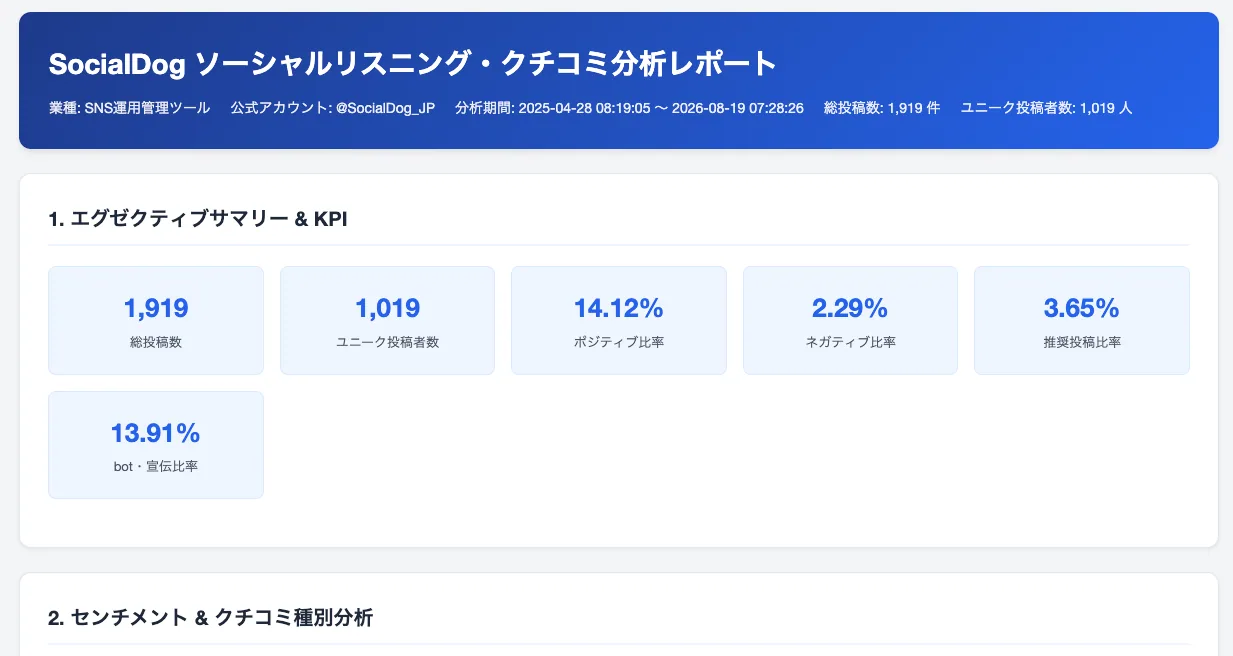
The report primarily includes the following:
- Executive summary / KPI cards (total posts, unique posters, positive/negative sentiment ratio, recommendation ratio, etc.)
- Sentiment analysis (overall, separate for posts vs. replies, and organic conversations excluding ads and bots)
- Conversation categories (feedback, requests, questions, recommendations, comparisons, ads, bots, irrelevant)
- Related keyword analysis (top 30 frequent words, positive vs. negative word comparison, co-occurrence words, competitor mentions)
- Topic aggregation (heatmaps showing which themes are generating dissatisfaction)
- Poster profiles (demographics, influence, location, activity level)
- Notable conversations / Analysis of recommendations and referrals (real customer voices for sales meetings)
- Issue identification and prioritized action plans
Since the report is contained on a single page, it can be used directly for internal sharing or sales materials. By verbalizing "who is talking about your company and what words they are using," it serves as a starting point for choosing content themes, writing ad copy, or creating help documentation.
4. Key points to keep in mind during operation
While the prompt includes very detailed rules, we do not recommend taking the AI-generated results at face value. Please verify the following points when using the report.
- Check the verification results displayed after step ①; if there are errors or incomplete items, re-run step ① instead of proceeding to step ②.
- Understand that poster demographics and locations are "estimates" based on profiles and should not be used for definitive conclusions.
- Do not confuse actual measurements with estimates that include prorated "unknown" values. Treat attributes with low identification rates as reference values only.
- If your brand name overlaps with common nouns or other company names, irrelevant posts (false positives) may be included. Check the number of candidate and confirmed posts in the report; if they are high, review your Keyword Monitor settings.
- The "Likes" column in the Keyword Monitor CSV file represents the poster's total likes, not the likes received by that specific post. Since impressions and reposts are not included, virality cannot be measured with this data (to analyze reach, see "Analyzing how far conversations reached (Virality/Reach edition)").
- Do not use the data to identify individuals; treat it as aggregate data and trends.
5. Summary
By collecting conversations with SocialDog's Keyword Monitor and running prompts A-1 and A-2 in sequence, you can easily visualize and analyze conversations that were previously difficult to process manually. The resulting HTML report covers everything from understanding "what voices are being heard" to identifying issues and creating specific action plans, making it directly applicable for sales meetings and marketing strategy preparation.
Furthermore, if you want to see how many people those conversations reached, combining this with the article on Conversation trends will provide a complete conversation analysis.
We hope you find this useful.
For detailed instructions on Keyword Monitor and Competitor post performance, please refer to Collecting posts containing keywords (Keyword Monitor) and Analyzing competitor accounts and posts (Competitor post performance).