By combining SocialDog's reporting features with AI, you can streamline your monthly performance analysis and content planning for the following month. In this article, we share two prompts that you can use in your actual operations.
*This article uses Google's generative AI, Gemini. While other AI tools can be used, we recommend using Gemini for better reproducibility of results and compatibility with the prompts in this article.

1. STEP 1: Prepare the report and bulk import CSV in SocialDog
First, prepare the source data from SocialDog for the AI to process.
1. Use SocialDog's PowerPoint report feature to export performance data for your connected X and Instagram accounts in PowerPoint format. (Available on Business and Enterprise plans)
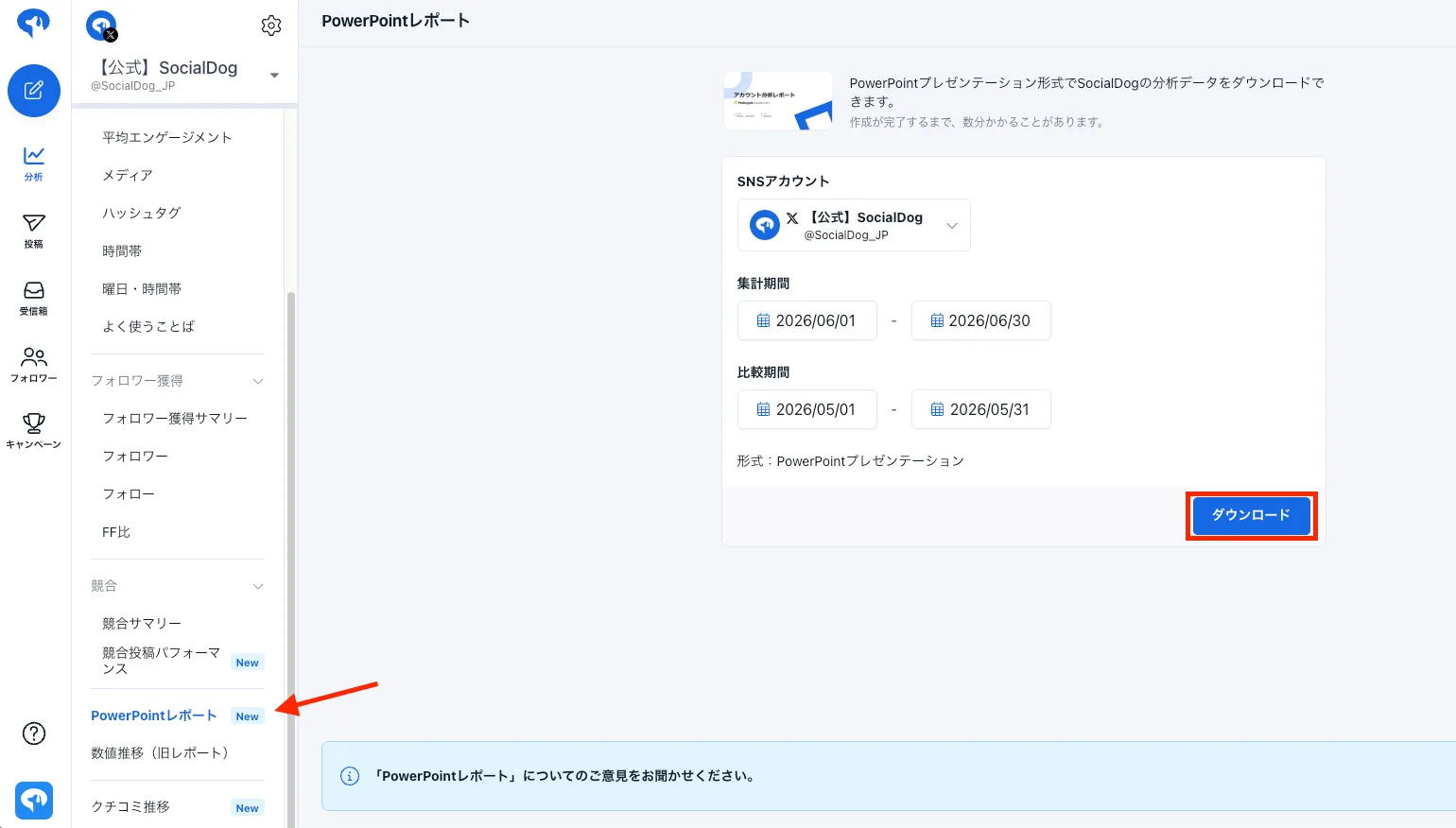
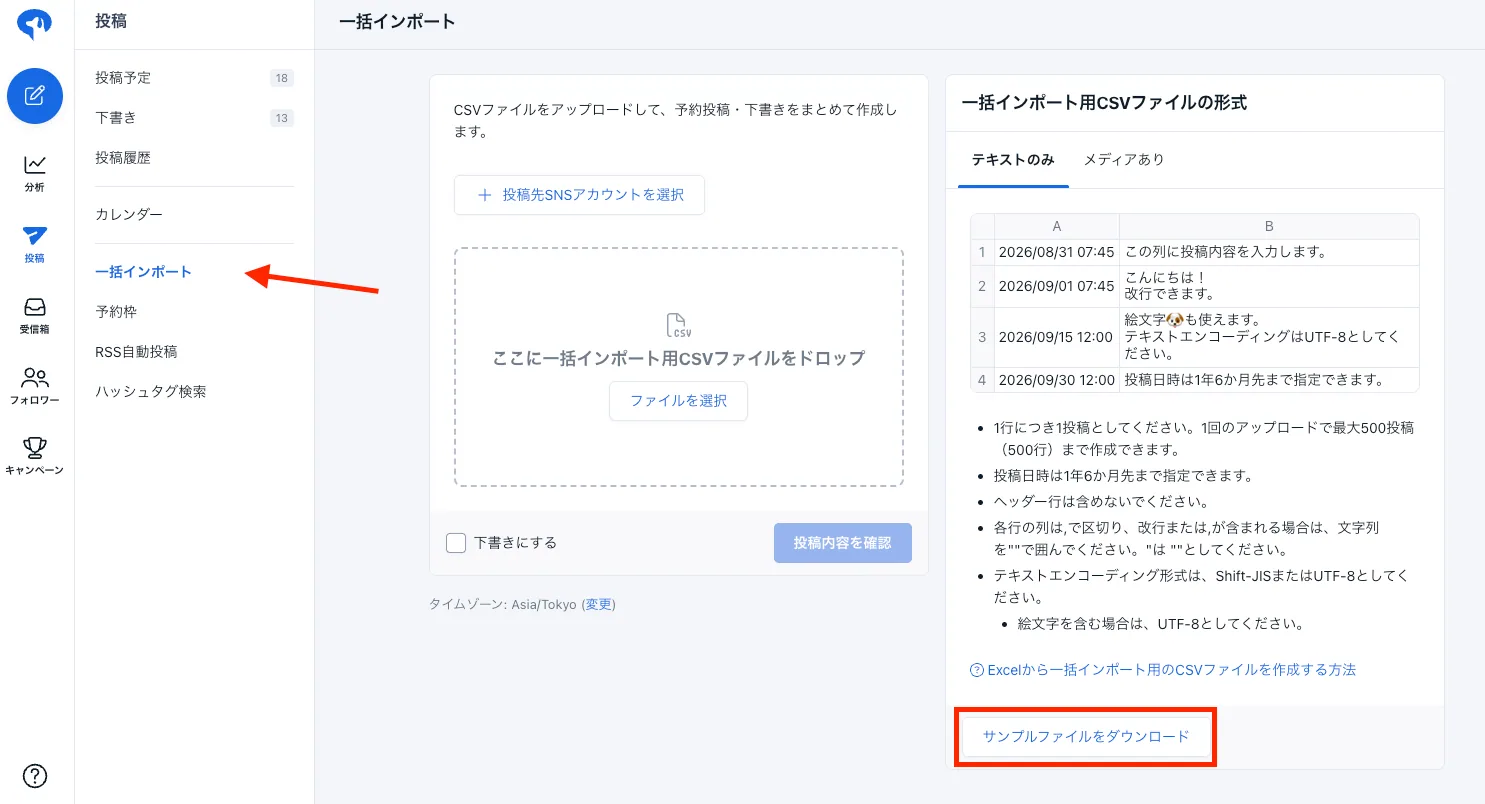
2. Download the sample file from SocialDog's "Bulk import" feature. This CSV file will serve as a template when asking the AI to create next month's post drafts in STEP 3, after it has analyzed the report.
2. STEP 2: Have the AI analyze the report [Prompt 1]
Attach the exported report (PowerPoint) to an AI chat like ChatGPT or Claude and send the following prompt. We've included the exact prompts we use internally.
*Please update the "Context" section (account goals, target audience, resources, etc.) to match your company's situation.
You are an SNS marketing expert.
Please read the attached "Last Month's X (formerly Twitter) Account Report"
and analyze it from the following perspectives to help create next month's posting strategy.
Prerequisites
- Account goal: (e.g., Increase brand awareness, lead generation)
- Target audience: (e.g., SMB owners, marketing managers)
- Resources: (e.g., 1 post per day on weekdays)
Confirmation of report reading (Most Important)
- Before starting the analysis, always confirm whether you can actually read the contents of the attached file (PowerPoint report, etc.).
- If you cannot properly retrieve the report content—such as being unable to open the file, read the numbers or text, or only being able to read part of it—do not create plausible-sounding analysis results based on guesses or generalities.
- In such cases, clearly reply that you "could not properly read the contents of the attached report," and provide the reason (if known) and a solution, such as requesting the data be reshared as text or CSV. (Do not proceed with the analysis if you cannot read it.)
Rules for reading numbers (Must check)
For key metrics in the report, basically read the numbers in the following format:
- Large number at the top: Actual value for the target period (this month)
- Number displayed below it: Difference from the comparison period (increase/decrease). This is not the actual value of the comparison period itself.
- Arrow symbols (↑, ↓) in the report are not part of the number or the digit "1," but are important indicators of the direction of change.
- When reading PDFs or images, always check the symbol next to the number to avoid misidentifying arrows as "1," "I," or "-".
Reading the difference:
- If "↑ [number]": Read as "This month's performance increased by that amount compared to the comparison period."
- If "↓ [number]": Read as "This month's performance decreased by that amount compared to the comparison period."
Example:
Impressions
This month: 31,059
↑5,950
-> Interpret as "Increased by 5,950 from the comparison period, reaching 31,059 this month."
-> Do not interpret as "The comparison period was 5,950."
Before analyzing, confirm that you are not confusing the "actual value for this month" with the "difference from the comparison period" for key metrics.
If you need to calculate the previous month's actual value:
- For an increase: This month's actual value - Increase amount
- For a decrease: This month's actual value + Decrease amount
Use these formulas for calculation.
Do not treat the difference value as the actual value of the comparison period. When comparing numbers, evaluating, or suggesting improvements, always list the "this month's actual value" and the "month-over-month change" separately.
Analysis requirements
- Overall summary: How key metrics like follower count, impressions, and engagement rate have changed compared to the previous month. Summarize the "current state of the account" based on the numbers in one sentence.
- Top performing / Underperforming posts: The top 3 posts with the best response and their commonalities (theme, format, posting time, writing style, etc.), as well as trends and possible reasons for posts with low engagement.
- Content trends: Which themes and formats (text, image, video, link, etc.) work best.
- Posting timing: Trends for days of the week and times with the best response.
- Insights for next month: Bullet points for "what to continue," "what to stop or reduce," and "what to try new."
Output format (Strict adherence)
- Never create "report materials" such as slides, presentation documents, PowerPoint, or Google Slides. Only text is required.
- No charts, tables, images, or file outputs are needed. Respond only with text (bullet points) in the chat.
- No need for suggestions or confirmations like "Should I summarize this in slides?"
- Avoid technical jargon and use simple language
- Keep each item concise, starting with the conclusion and using bullet points
- Summarize "Next month's strategy" in 3 lines or less at the end
- (Reconfirmation) Do not generate slides or report files. Output only the "text analysis results."
3. STEP 3: Create next month's post drafts based on analysis results [Prompt 2]
Once you have the analysis results from STEP 2, attach the CSV file (Bulk import format) downloaded in STEP 1 in the same chat and send the following prompt.
*Please update the "Context" section (account goals, target audience, resources, etc.) to match your company's situation.
You are a social media management expert.
Based on the "analysis results of the previous month's report" and the attached CSV file,
please create draft X posts for the next month
and output them in the format of the attached CSV.
Prerequisites
- Account goal: (e.g., Increase brand awareness, lead generation)
- Target audience: (e.g., SMB owners, marketing managers)
- Management resources: 1 post per day (create rows for the number of days in the target month)
- Tone & manner: Refer to the attached "Last month's posts" and match the tone, including writing style, endings, phrasing, emoji usage (type, quantity, placement), and hashtag usage
- (Note) Follow existing policies such as being polite but not too formal and minimizing technical jargon
- Avoid using new expressions or emojis that weren't used last month, and stick to the account's existing atmosphere
Creation policy (reflecting last month's analysis)
- Actively reflect "What to continue" in the post drafts
- Avoid "What to stop or reduce"
- Incorporate "New things to try" about once a week
- Assign post dates and times prioritizing days and time slots with high engagement
- Balance themes and formats across the entire month to avoid repetition
- When creating posts that mention the day of the week or date (e.g., "Today is Monday"), always check a calendar to ensure the date and day are correct before writing (do not guess; ensure there are no mismatches)
- After creating the drafts, perform a self-check before outputting. Review all lines for typos, missing words, conversion errors, unnatural phrasing, or broken emojis, and correct any issues found
- Specifically check for inconsistent spelling or errors in proper nouns
- Perform the check internally; do not include comments or check results in the final output. Only output the corrected final version
Prohibitions (Strictly follow)
- Do not create posts based on unannounced new features, products, or future release schedules (no fictional release announcements or teasers)
- Do not include links or calls to action for unpublished articles or non-existent blogs
- Do not include unverified information (numbers, achievements, case studies, quotes, etc.) in posts
- Do not include URLs or links unless they are confirmed to exist (if unsure, omit the link and provide text only)
- If uncertain, do not guess; output that post draft as "elements only" (no links or proper nouns)
- Do not include days or dates (e.g., "Today is Monday," "Today is the Xth") in posts without verifying them on a calendar
Output format (Important)
Output the data in "TSV (Tab-Separated Values) format," fully optimized for direct copy-pasting into Google Sheets, enclosed in a code block (tsv ...).
[Strict rules to prevent formatting issues when pasting]
- Do not include any introductory explanations or category labels (like bracketed text at the beginning, e.g., [Intro: ...] or [Tips: ...]) in the post text. Start directly with the text to be posted.
- Separate Column A (Post date/time) and Column B (Post content) with a "Tab."
- If the post content contains line breaks, enclose the entire string in Column B in double quotes ("). Escape any double quotes within the text as ("").
- If there are no line breaks in the text, output it without double quotes.
- Ensure the format allows for clean pasting into two columns (Column A: Post date/time, Column B: Post content) when selecting cell A1 in a spreadsheet and pasting (Ctrl+V / Cmd+V), maintaining line breaks within cells and avoiding extra blank rows.
- Do not include unnecessary blank lines between data rows, and do not add extra line breaks at the beginning or end of the data.
[Structure rules]
- One post per row (excluding line breaks within cells), and output data for the number of days in the target month.
- Column A "Post date and time": Use YYYY/MM/DD HH:MM format (e.g., 2026/07/01 08:00).
- Column B "Post content": Final text that can be posted as-is (within 140 characters, emojis and line breaks allowed). Descriptive text like "Post about..." is strictly prohibited.
- For post dates and times, prioritize days and times with high engagement based on analysis results, and set one post per day without duplicates.
- Use UTF-8 text encoding (emoji compatible).
*Do not include any greetings, introductions, explanations, headings, or confirmation comments in the final chat output. Output only the data section (TSV text) enclosed in a code block directly.
4. STEP 4: Bulk schedule next month's post drafts in SocialDog
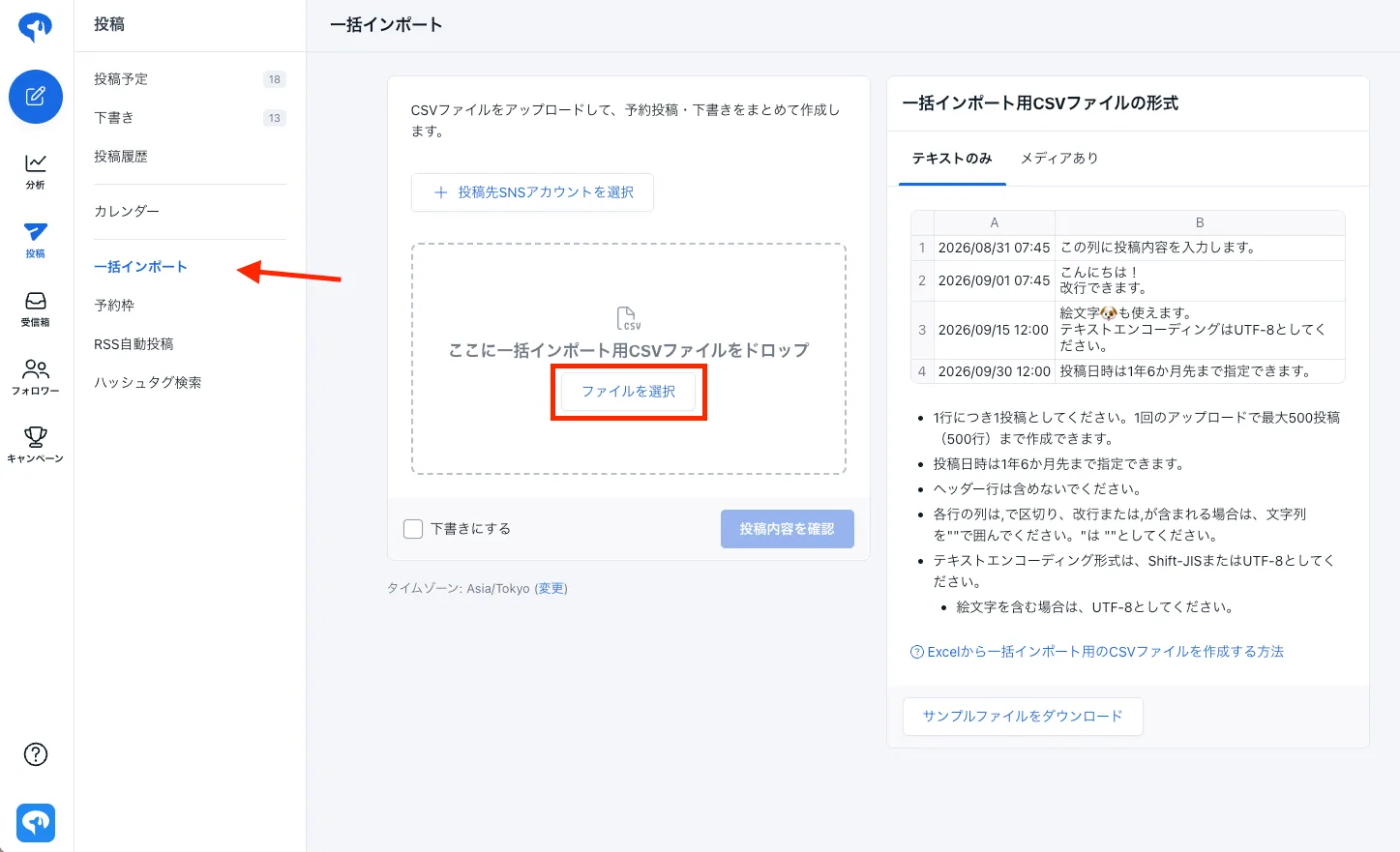
Copy the generated post draft code and paste it into Google Sheets. Since the code formatting might occasionally break, adjust it as needed to match the format of the Bulk import CSV downloaded in STEP 1.

Once ready, download the Google Sheet as a CSV and upload it using SocialDog's "Bulk import" feature for scheduled posts. This completes the scheduling for the entire next month at once.
5. Key points for operation
Although the prompt includes very detailed rules, we do not recommend publishing or uploading AI-generated results as-is. Please check the following points before use.
- Replace the "Assumptions" section of the prompt (account goals, target audience, operational resources, tone & manner) with your own company's situation.
- Visually verify that the numbers in the analysis results match the actual report figures.
- Check that the post drafts do not contain any factual inaccuracies (such as mentions of unreleased products or features).
- Double-check that any posts mentioning days or dates match the actual calendar.
6. Summary
By systematizing data output and registration with SocialDog's "Automated reports" and "Bulk import" features, and letting AI handle "Analysis" and "Next month's post draft creation," you can significantly streamline your monthly PDCA cycle.
We hope you find this useful.
For detailed instructions on "Automated reports" and "Bulk import," please refer to Create a PowerPoint report and Bulk import posts via CSV file.