SocialDog offers useful SNS management features, such as follower management, collecting posts with specific keywords, and checking users who reacted to your posts. This article focuses on follower management and Inbox-related features.
*The features introduced in this article are only available for X (Twitter).
Follower Management
SocialDog's Followers feature allows you to view followers categorized in various ways.
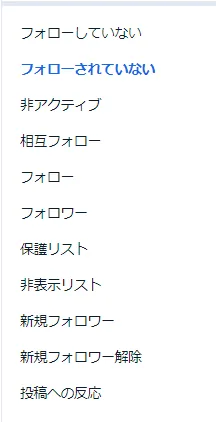
By regularly checking categories such as Not Following Back, Inactive, and New Unfollowers, you can monitor your follower-to-following ratio and maintain a healthy account.
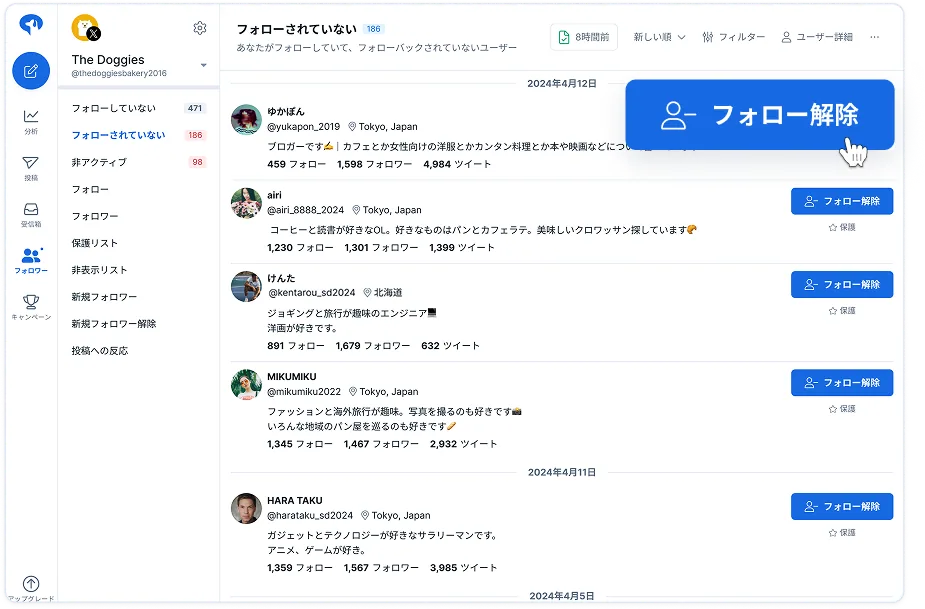
Checking users who don't follow you back
Follow these steps to check users you follow who are not following you back.
- Click Followers.
- Click Not Following Back.
- You can unfollow them with a single click within SocialDog.
Checking users who unfollowed you
Follow these steps to check users who have unfollowed you.
- Click Followers.
- Click New Unfollowers.
Sorting and filtering
You can change the sort order of users or use filters to narrow down the list. For example, you can display only users who meet specific criteria, such as follower count or account activity.
*Follower data is not updated in real time. For more information on update timing, please refer to Introduction 2: Checking past data.
Related articles:
- Changing the user sort order
- Filtering users by criteria
- List of items available in Advanced filter
- Examples of using filters
Next steps
Now that you understand how to use follower management and Inbox features, let's move on to Introduction 5: Analyzing follower acquisition and posts.